
Mount Pleasant managed IT
Microsoft 365 for your Charleston business
CloudCentric sets up and runs the right plan for every person on your team, serving businesses from Charleston to Savannah.
Microsoft 365 plans for your industry
CloudCentric matches your staff to Microsoft 365 features based on their daily work. Pick your business type below to view our standard setups.
Recommended plans
Daily staff work
Related guides

Microsoft 365 business and frontline plans
Microsoft licenses are assigned per person. CloudCentric assigns exact licenses based on actual needs, putting different features into your tenant.
Office staff needing basic email and web versions of Word and Excel.
- Web and mobile Office apps
- 100 GB primary mailbox
- Teams chat and meetings
- 1 TB of cloud storage
Managers and administrative staff requiring desktop versions of Office apps.
- Desktop versions of Office apps
- Up to 5 PCs or Macs, 5 tablets and 5 phones per user
- Webinar and meeting recording
- Core identity and access management
Teams handling sensitive data and requiring device security and management.
- Device security and management
- Email and threat protection
- Sensitive data discovery
- Policy identity and access management
Field and shift workers accessing resources away from a desk.
- Teams and company intranet
- Editable web Office apps
- Mailbox included with F3
- Sit beside business plans
Licenses mix together inside one tenant, matching individual staff needs.
Inside your Microsoft 365 portals
CloudCentric manages your environment through administration centers. Portals display billing, active users and threat analytics, giving full control over organizational identities and devices.
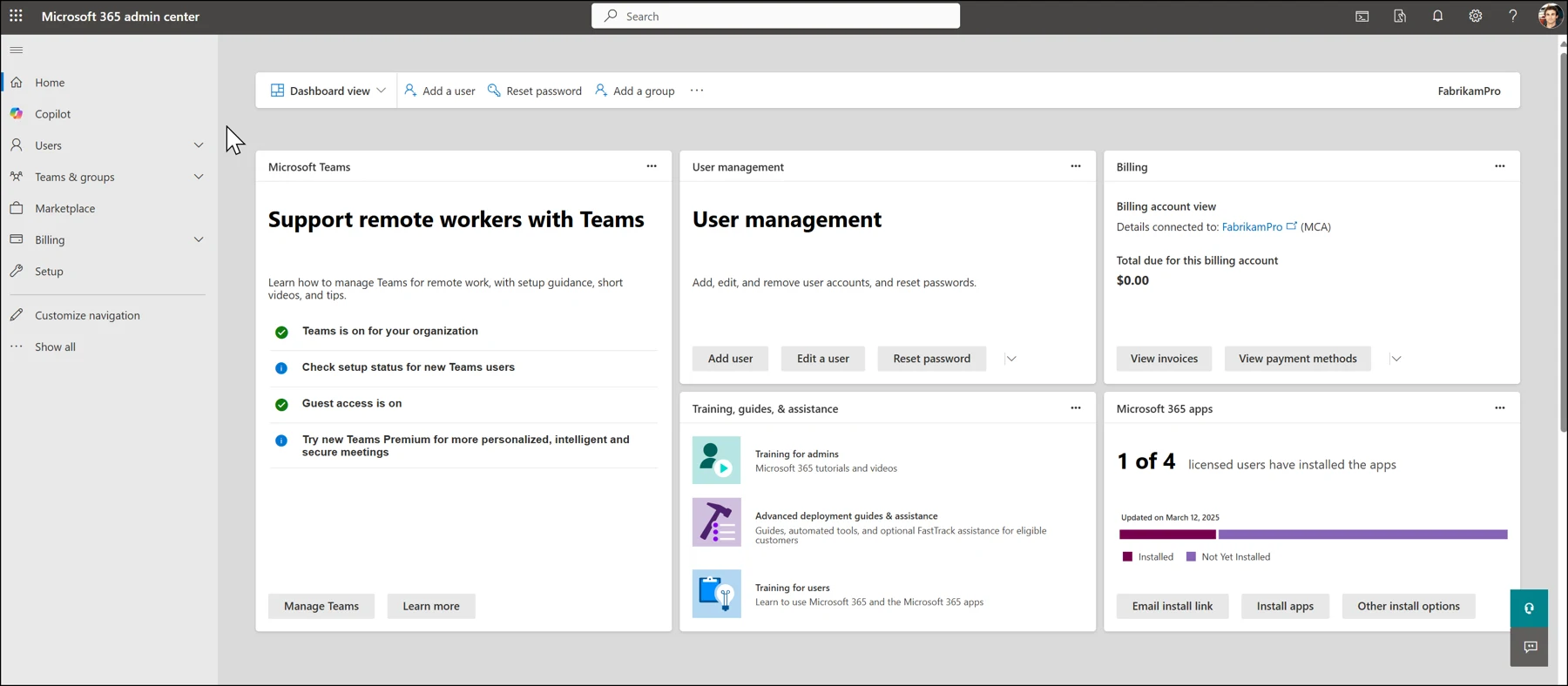
Dashboard view shows cards for Microsoft Teams, user management, billing and installed applications. CloudCentric tracks licensed users and manages global tenant settings from this portal.
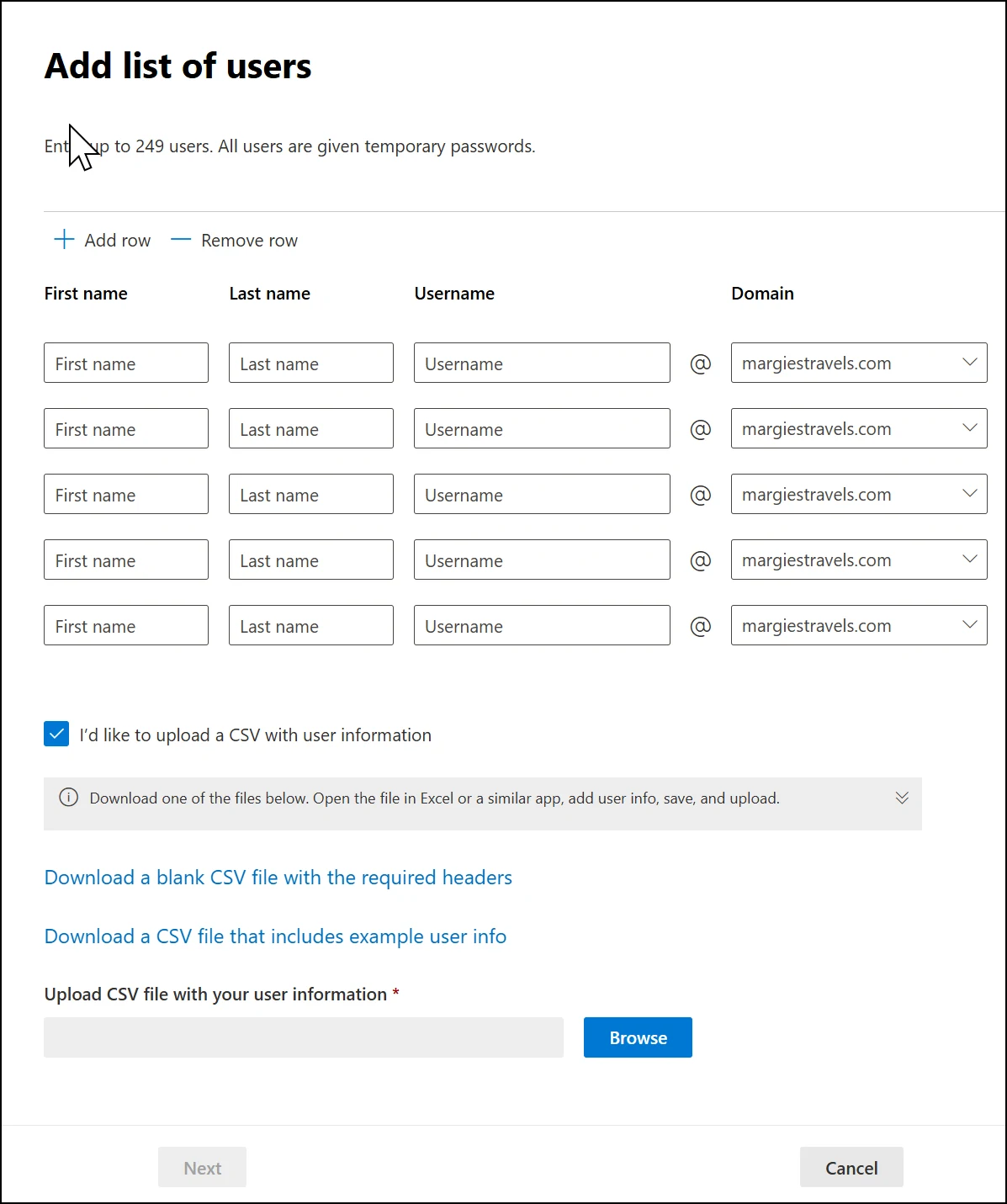
Users receive accounts individually or through an uploaded file list. CloudCentric uses home page buttons to add accounts and assign specific licenses per person.
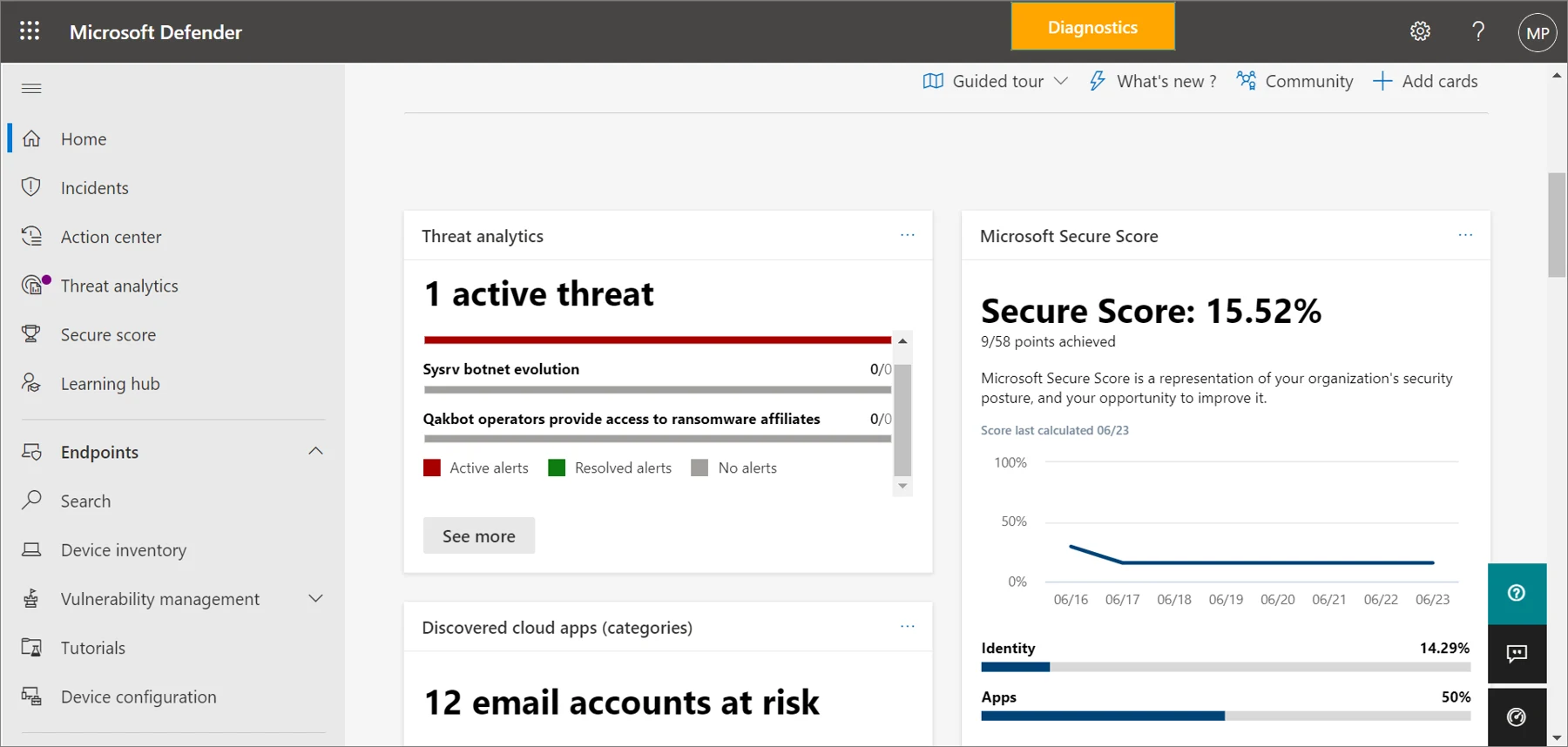
Microsoft Defender portal shows threat analytics, Microsoft Secure Score and incident menus. CloudCentric uses Defender for Business features to secure organizational identities and manage local devices.
Screenshots are Microsoft's own, from Microsoft Learn. Microsoft Learn
Microsoft 365 licensing and security guides
Detailed breakdowns explain differences between specific plans and add-ons. CloudCentric uses these exact features to build your local business environment.
- Azure Virtual Desktop for Charleston businessesAzure Virtual Desktop for Charleston businesses. CloudCentric sets up and manages Microsoft cloud desktops for your staff across the coast to Savannah.
- Exchange Online Plan 1 vs Plan 2 in CharlestonReview Exchange Online plans for your business. Plan 2 adds a growing archive and litigation hold for records, while Plan 1 fits standard mailboxes.
- Microsoft 365 Business Basic vs StandardCompare Microsoft 365 Business Basic and Business Standard plans to find the right email, file storage, and software mix for your staff.
- Microsoft 365 Business Standard vs PremiumCompare Microsoft 365 Business Standard and Business Premium pricing, features, and security capabilities to decide which plan suits your business.
- Microsoft 365 Conditional Access LicensingLearn how Conditional Access controls sign-in security and compare which Microsoft 365 plans include it or allow it as an add-on.
- Microsoft 365 DLP Rules & Licensing GuideUnderstand Microsoft 365 data loss prevention features, which content locations are covered, and the specific licenses required for your business.
- Microsoft 365 F1 vs F3 for Frontline StaffCompare Microsoft 365 F1 and F3 features and pricing to select the right license for your shift, site, or desk-less staff.
- Microsoft Copilot: Features, Licensing & CostsLearn what Microsoft Copilot does, how it accesses information, and what the licenses cost for your business.
- Microsoft Defender for Business Plans & PricingUnderstand how Microsoft Defender for Business secures your devices and find out which Microsoft 365 plans include it.
- Microsoft Intune Device Management & LicensingLearn how Microsoft Intune secures company devices and find out which Microsoft 365 licences include device management.
- Microsoft Teams Phone Requirements, Plans & CostsUnderstand how Microsoft Teams Phone works, what it costs per user, and which Microsoft 365 plans support it for your business.
- SharePoint intranet setup for Charleston businessesProfessional SharePoint consulting for local businesses. Set up central intranet sites for company news, policies, and forms with full file migration.
- Windows 365 Cloud PC Editions & RequirementsLearn what a Windows 365 Cloud PC is, compare the Business and Enterprise editions, and understand the licensing requirements for your organisation.
Setup and launch process
CloudCentric configures your Microsoft 365 tenant and brings your staff online. Managed IT services include adding users and assigning licenses per person.
- 1
Users added from a list
CloudCentric uploads your staff directory to the administration center, creating a unique account for every person.
- 2
Right plan assigned
Staff receive specific licenses matching daily work, placing basic, standard and premium plans together inside one tenant.
- 3
Devices and sign-ins protected
CloudCentric applies core identity management and configures Defender for Business to secure staff laptops and phones.
- 4
People shown their apps
Local staff log into their accounts and access custom email, Teams chat and desktop Office applications.

Common Microsoft 365 questions
- Can different Microsoft 365 plans be mixed in one business?
Licenses are assigned per person, allowing different plans to sit inside the same tenant. Frontline plans sit beside business plans to match exact individual staff needs.
- How many people does a Microsoft 365 Business plan cover?
Microsoft 365 Business Basic, Business Standard and Business Premium plans cover one to 300 users. Every business version shares this exact user limit for local organizations.
- Is Microsoft Copilot included in Business Standard or Premium?
Copilot is bought on top of a plan. Microsoft sells Business Standard with Copilot and Business Premium with Copilot as entirely separate plans.
- What differentiates Business Standard and Business Premium plans?
Business Premium adds device security and management, email and threat protection, and sensitive data discovery to Business Standard. Premium includes Defender for Business, Intune Plan 1 and Entra ID P1.
- Why are no prices shown on this page?
Microsoft publishes its own current price list on microsoft.com. Visitors can find current rates through the link provided above.
- Who sets up and runs Microsoft 365 for local businesses?
CloudCentric sets up and manages Microsoft 365 tenants for customers. Managed IT services include adding users, assigning licenses, mixing plans per person and managing device security.
Start your Microsoft 365 setup and launch
Call (844) 422-7000 or book a walkthrough to set up your Microsoft 365 environment.