
Hosted Microsoft desktops
Windows 365 Cloud PC for Charleston businesses
Your Windows desktop opens on a tablet, a Mac or a browser, licensed and set up by CloudCentric for businesses from Charleston to Savannah.
See Windows 365 for business in your company
Select your kind of company to see a hosted Windows desktop fitting your daily routine.
Recommended size
Typical tasks
Example daily routine
Open your desktop using the Windows 365 app
Look through Microsoft interfaces. Your team members navigate simple menus to find and launch their company computers.
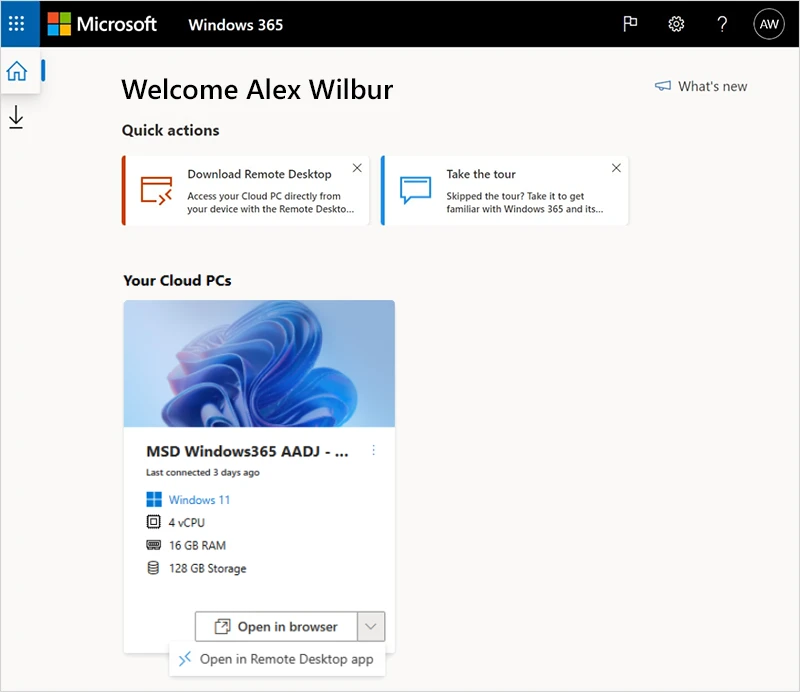
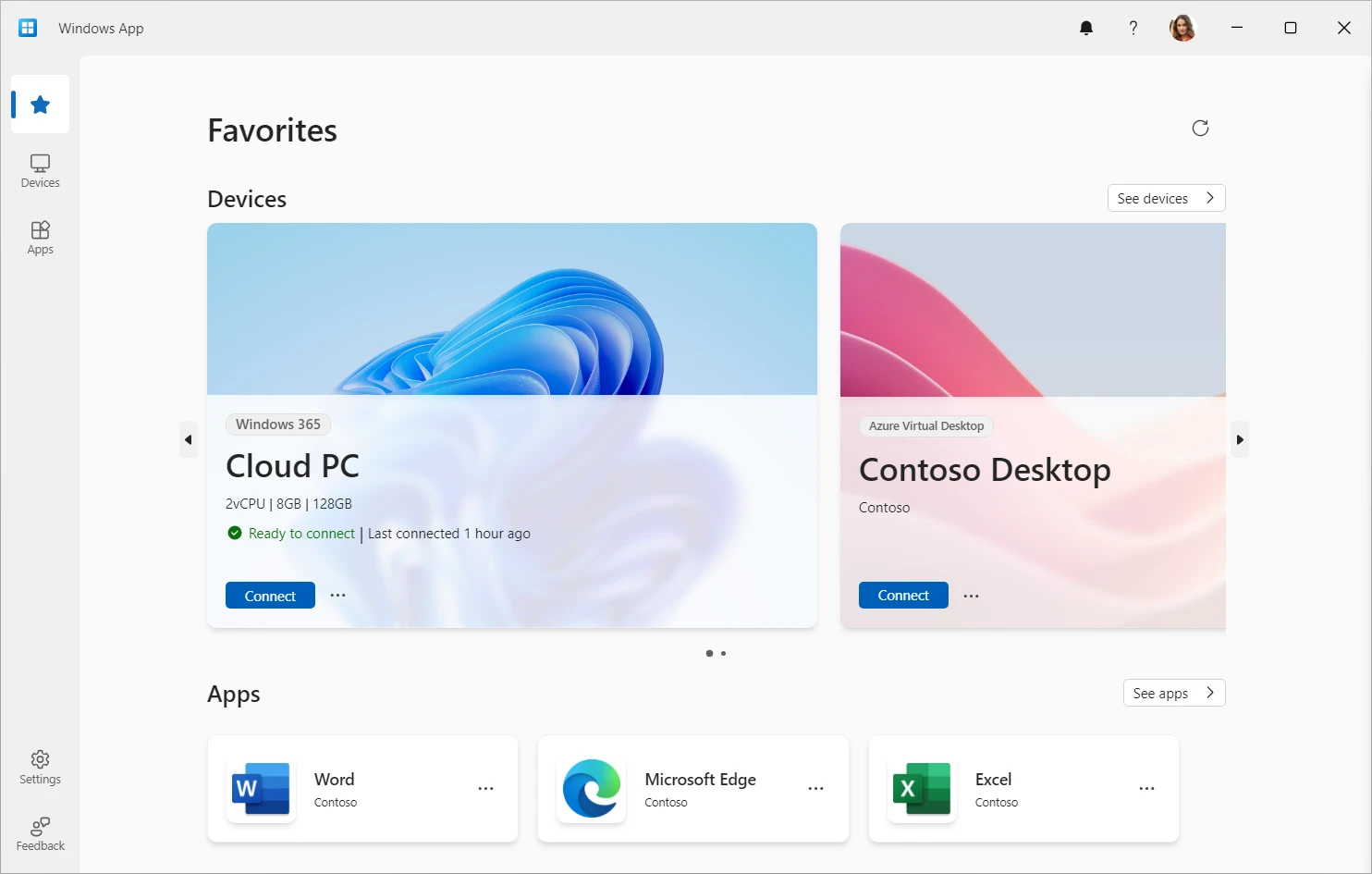
Users see available cloud machines displaying processor, memory and storage capacity.
Connections happen across multiple monitors, redirecting audio, cameras, and local printers directly into active sessions.
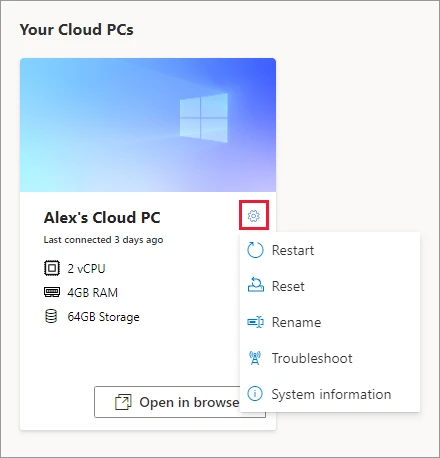
Business edition users restart, reset, rename and troubleshoot personal machines from an online portal.
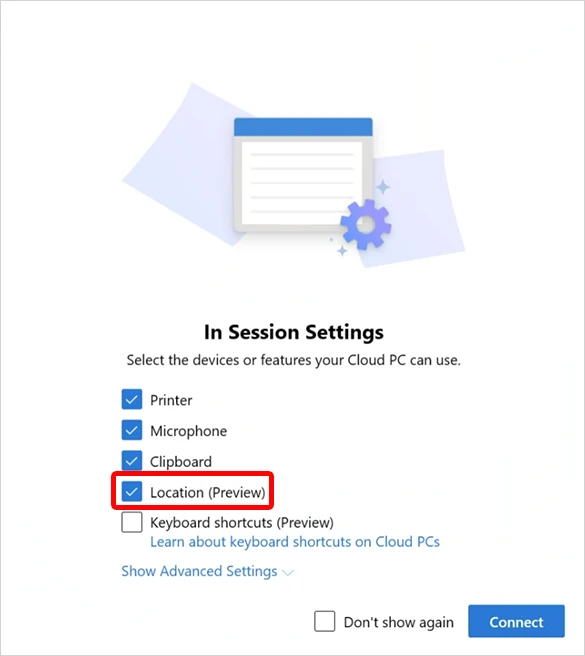
Microphone, clipboard, local printer and location access controls appear before starting browser sessions.
Microsoft screenshots shown unedited to illustrate actual interfaces. Microsoft Learn
Connect using any device or Windows 365 Link
Your staff members open their hosted computers on existing hardware or dedicated terminals.
Signing in requires an official company or school account, skipping personal Microsoft profiles entirely.
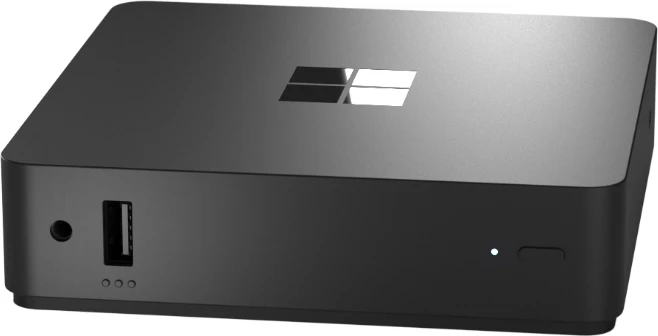
Built for cloud connections
Measuring 4.72 by 4.72 by 1.18 inches, Windows 365 Link stores zero data and runs no local apps. Managed in Microsoft Intune, access requires dedicated user licenses across select markets.
Image: Microsoft Learn
Pick Windows 365 Business memory sizes
Match processing power to daily tasks. Standard business machines arrive with varying processor and memory configurations.
2 vCPU, 4 GB
Frontline workers, customer service desks, call centers and short-term or seasonal jobs.
Example work roles
2 vCPU, 8 GB
People working from home, outside consultants bringing personal computers.
Example work roles
4 vCPU, 16 GB
Healthcare services, finance roles, consultants and remote staff needing extra power.
Example work roles
8 vCPU, 32 GB
Engineers, developers, content creators and design professionals requiring substantial memory.
Example work roles
16 vCPU, 64 GB
Financial services, heavy engineering, data analysis and high-end development tasks.
Example work roles

Compare Windows 365 Business or Enterprise plans
Small offices typically select standard business configurations. Larger organizations needing network control pick enterprise platforms.
Companies with fewer than three hundred people wanting simple setups.
- Who can buy it
- Any organization wanting hosted desktops.
- What each person needs
- Only a standard user license.
- Setup
- Automatic creation joined to company directories upon license assignment.
- Management
- Administrators assign and unassign licenses without granular troubleshooting policies.
- Network
- Outbound data metered by memory tier before bandwidth restrictions apply.
- Limit
- Maximum three hundred users per company account.
Organizations controlling updates, managing custom software deployments, and accessing local networks.
- Who can buy it
- Companies requiring centralized management capabilities.
- What each person needs
- Windows Enterprise, Microsoft Intune and Microsoft Entra ID P1 required.
- Setup
- Custom images built over Azure virtual networks linking local resources.
- Management
- Full Intune policy management, application deployment, updates and troubleshooting controls.
- Network
- Customer Azure network bandwidth rates apply directly.
- Limit
- Unlimited users per company account.
Two enterprise prerequisites sell separately. Microsoft Intune Plan 1 and Microsoft Entra ID P1 cost extra per user monthly on annual subscriptions.
Published Microsoft prices checked on November 1, 2026. CloudCentric quotes setup costs separately. Per user a month, paid yearly. Intune price list Entra ID price list Microsoft comparison
Restoring files and maintaining control
System settings let users fix issues directly. Administrators retain oversight while managing license expirations.
Restore points
Systems save points automatically. Restoring loses changes made since your selected point, including recent software installs. Files kept online in OneDrive remain safe.
Restart and reset
Users restart or reset personal machines directly. Resetting reinstalls Windows entirely, removing personal files, settings and applications. Backing up data first prevents permanent loss.
Resilience
Microsoft maintains immense system availability. Compute recovery happens automatically within zones, maintaining high resilience for stored data objects.
License ending
Expired subscriptions provide normal access briefly, moving to disabled stages where administrators alone access data. Canceling immediately moves machines into disabled phases before deletion.

Four simple Windows 365 setup steps
CloudCentric manages your entire onboarding sequence. Your team gains secure remote access without complicated technical hurdles.
- 1
Choose edition and machine sizes
We review daily tasks to match memory sizes to staff requirements.
- 2
Assign licenses to your staff
Your Microsoft account creates hosted machines automatically as we attach user licenses.
- 3
People sign in remotely
Employees open connections from personal hardware, office laptops, or dedicated terminal devices using secure credentials.
- 4
Review access and recovery settings
Administrators configure file transfer restrictions, printer access rules, and OneDrive backup connections.
Common questions from local business owners
- What is a Cloud PC?
A full Windows desktop hosted entirely by Microsoft. Staff access files and applications from a web browser, Apple hardware, Android devices or regular computers.
- Do I need a Microsoft 365 plan first?
Standard business editions work independently without preexisting plans. Companies buy licenses directly from Microsoft or through partners like us.
- What does a Cloud PC cost per person?
Microsoft charges fixed monthly fees per user based on memory size. Our specialized CloudCentric setup services quote separately.
- Does my Cloud PC work on a Mac or iPad?
Apple users connect securely via dedicated software or web browsers. Multiple monitors, local printers, and cameras integrate perfectly.
- What happens to my files when a Cloud PC is reset?
Resetting deletes local applications and files, reinstalling Windows completely. Saving documents in OneDrive preserves important records during resets.
- What happens when a license is removed or a subscription ends?
Access disables gradually. Expired subscriptions remain active briefly before locking users out. Canceled plans disable immediately, leaving data accessible only to administrators before permanent deletion.
- Where does CloudCentric provide setup and support?
We manage information technology systems for local businesses located along the coast from Charleston down to Savannah.
Start managing remote work securely
Call our Mount Pleasant office to discuss connecting your team to Microsoft hosted desktops.