
Email license comparison
Exchange Online Plan 1 vs Plan 2
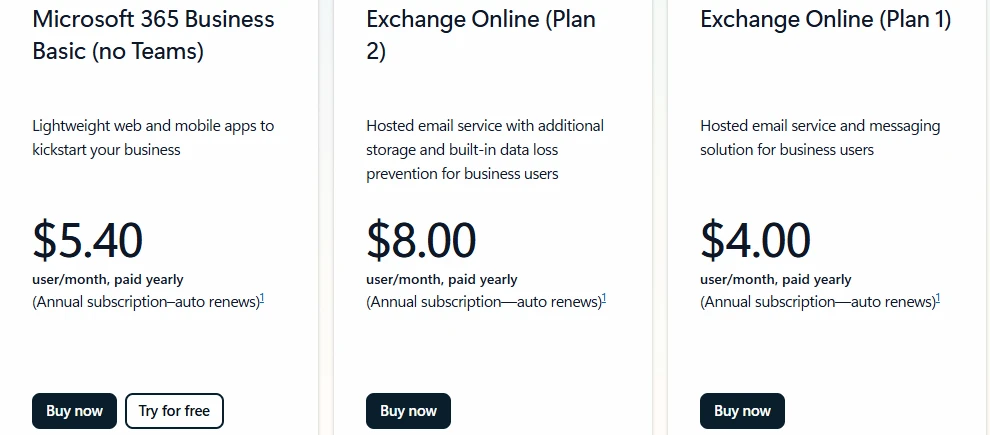
Plan 2 adds a growing archive, litigation hold and data loss prevention for $4.00 more per user per month at Microsoft list prices, checked November 2, 2026.

Review email options
Compare Microsoft Exchange Online plans
Licenses are assigned per person, meaning one company can mix Plan 1 and Plan 2. Review exactly which tools each person requires for daily work.
- 1
Core email features
Both plans give email on the company domain, a 150 MB message limit, Outlook on the web and phone, retention labels and transport rules.
- 2
Upgraded storage and records
Plan 2 adds a 100 GB mailbox, an archive growing to 1.5 TB, litigation hold, data loss prevention and voicemail.
- 3
Custom plan assignment
We review how each person uses email and assign the proper plan per person.
Exchange Online Plan 1 price and options
Review Microsoft licenses for business email. Companies can assign different plans to different people depending on individual storage and hold requirements.
Review license options
Microsoft published prices per user per month paid yearly, checked November 2, 2026.
Compare plan features
See exactly which features come with each Exchange Online license to help match people with the right tools.
| Exchange Online Plan 1 | Exchange Online Plan 2 | Microsoft 365 Business Basic | |
|---|---|---|---|
| Price | $4.00 | $8.00 | $7.00, with Teams |
| Mailbox size | 50 GB | 100 GB | 100 GB |
| Archive size | 50 GB | 100 GB, grows to 1.5 TB | 50 GB |
| Shared mailbox size | 50 GB | 100 GB with Plan 2 | 50 GB |
| Hold | No | Yes | No |
| Data loss prevention | No | Yes | No |
| Voicemail | No | Yes | No |
| Inactive mailboxes | No | Yes | No |
Microsoft published prices per user per month paid yearly, checked November 2, 2026. Mailbox and archive limits: Microsoft Learn, Exchange Online limits. Features: Exchange Online service description. Checked November 2, 2026.
Exchange Online archive capacity
Plan 2 archive starts at 100 GB per user and grows automatically to 1.5 TB when auto-expanding archiving is turned on. Plan 1 holds 50 GB.
Exchange Online Kiosk plan has a 2 GB mailbox and no archive. Bars share one unified measurement scale.
Plan matches by business
Different roles require different email setups. Review typical licenses assigned across common business environments in Charleston.
Select a business type
View related services
Assigning Exchange Online plans
Deploying email licenses follows a clean path. We manage the technical details to match your business requirements.
- 1
List user email needs
List who uses email and how.
- 2
Assign exact licenses
Assign Plan 1 or Plan 2 to each person.
- 3
Move mail and configurations
Move mail and set shared mailboxes.
- 4
Check retention settings
Check hold and data loss prevention settings where they apply.
Frequently asked questions
- What is the difference between Exchange Online Plan 1 and Plan 2?
Plan 2 adds a 100 GB mailbox, an archive growing to 1.5 TB, litigation hold, data loss prevention and voicemail. Plan 1 offers a 50 GB mailbox and 50 GB archive.
- How much does each cost?
At Microsoft published prices checked November 2, 2026, Plan 1 costs $4.00 per user per month paid yearly. Plan 2 costs $8.00 per user per month paid yearly.
- How big is the archive mailbox?
Plan 1 provides a 50 GB archive. Plan 2 starts with 100 GB and grows automatically to 1.5 TB when auto-expanding archiving is turned on.
- Can one company mix Plan 1 and Plan 2?
Yes, licenses are assigned per user. One company can hold Plan 1 for some people and Plan 2 for others based on individual storage and hold requirements.
- Does a shared mailbox need a license?
A shared mailbox does not need its own license to hold 50 GB. Reaching 100 GB or applying a litigation hold requires an assigned license.
- Does Plan 1 include Outlook on my computer?
Plan 1 and Plan 2 include Outlook on the web and phones. Connecting the desktop application requires an account with Microsoft 365 desktop app rights.
Review your email licenses
Book a conversation with our Mount Pleasant team to align your Microsoft plans.