
Computer and phone protection
Catch threats running on computers and phones with endpoint detection and response
CloudCentric secures company laptops and mobile devices from threats on the hardware itself, serving offices from Charleston to Savannah.
Secure company files
Endpoint security for company hardware
Microsoft Defender for Business provides endpoint security for organizations of up to 300 users. Protection covers computers and phones against ransomware, malware, phishing and other threats on the devices themselves.
- 1
Threats running on hardware
Endpoint security catches threats already running on a laptop, rather than threats arriving in company mail messages.
- 2
Compromised machines isolated
Affected computers can be cut off from the rest of the network while the machine is dealt with and investigated.
- 3
Windows, Mac, iPhone and Android
Endpoint protection covers Windows, Mac, iOS and Android devices assigned to company staff members.
Everyday security operations and responses
Administrators manage alerts, monitor risk levels and investigate suspicious activity from a central portal. Remediation actions address problems directly on the affected computer or phone.
Select a security situation
- 1
- 2
- 3
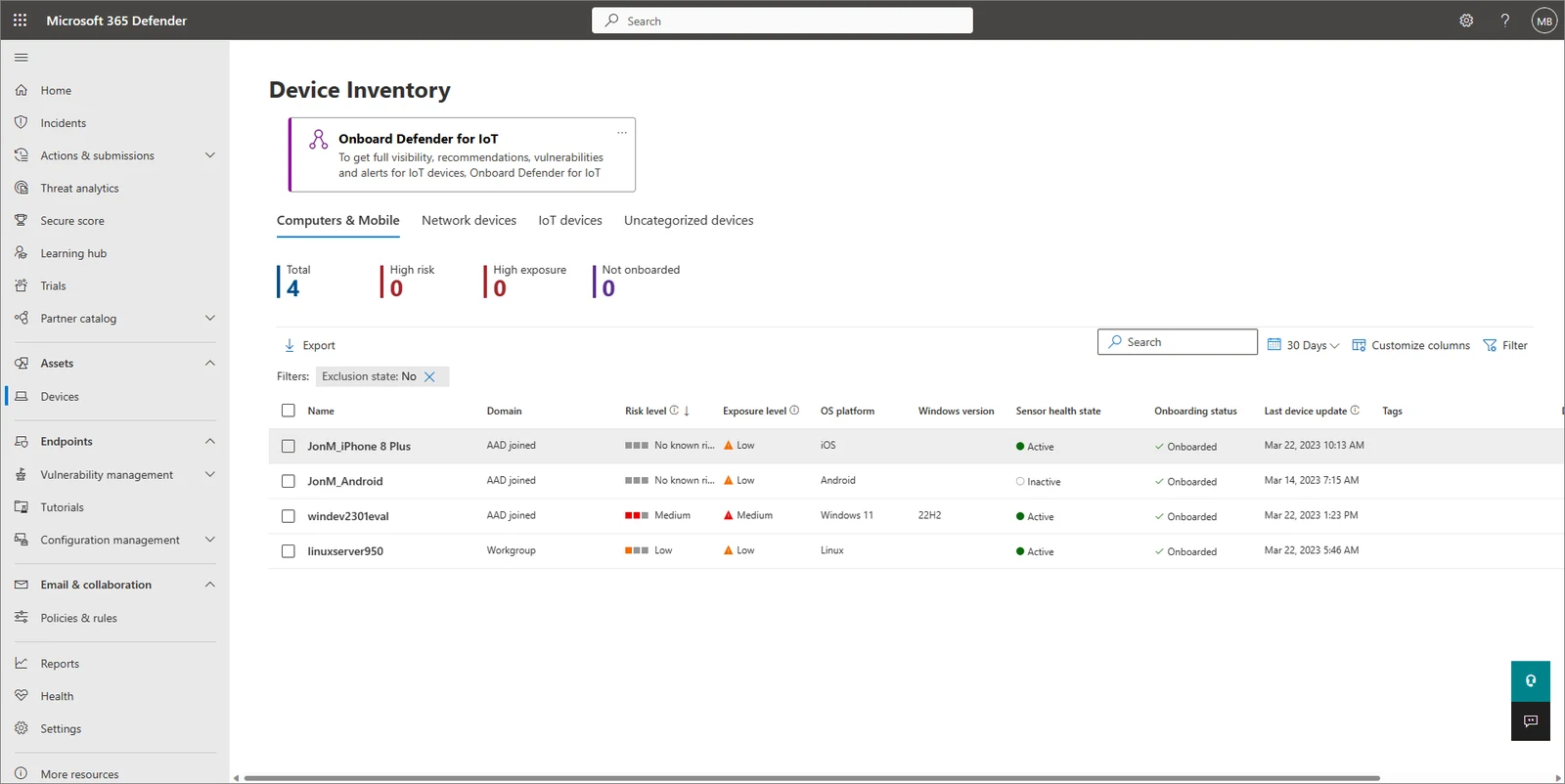
Endpoint protection for local organizations
Different organizations carry different hardware arrays. Microsoft Defender for Business applies consistent security rules across every device type your staff operates daily.
Computers and phones
Security situations

Responding to threats on hardware
Remediation actions address malicious activity when a computer is found to have a threat. Specific steps depend entirely on the situation and the nature of the detected risk.
Certain remediation actions run automatically or wait for manual approval based entirely on configured security settings.
Microsoft 365 plan combinations
Microsoft Defender for Business works alongside existing productivity software. Certain subscriptions include it natively, while others require an additional line to cover computers and phones.
Select a Microsoft 365 plan
Microsoft publishes these US list prices per person per month, paid yearly on an annual subscription, checked on November 1, 2026.
Two separate products acting in different places
Computers and phones
Defender for Business protects computers and phones. Business Premium already contains Defender for Business, making an extra license unnecessary.
Company mail messages
Defender for Office 365 works on mail, checking what a message carries beyond standard spam filtering, at $2 a seat, a month for Plan 1.
Deploying protection across company devices
- 1
Devices are onboarded
Windows machines enroll via local script, Group Policy or Microsoft Intune. Mac, iPhone and Android hardware receive onboarding too.
- 2
Default policies apply
Guided setup configures default security policies designed to protect company devices from day one, requiring no specialized security knowledge.
- 3
Threats are handled
Detected threats trigger remediation actions, leading to automatic steps like quarantining a file, or manual approval inside the Action Center.
- 4
Monthly summary arrives
Administrators open the monthly security summary report or generate a PDF showing prevented threats and the current Microsoft Secure Score.

Common questions about endpoint protection
- What is Defender for Business?
Microsoft Defender for Business is an endpoint security product for businesses of up to 300 users. Hardware remains protected against ransomware, malware and phishing on the devices themselves.
- Which computers and phones does it cover?
Protection covers Windows, Mac, iOS and Android devices under a single umbrella. Servers are a separate line and require an additional, specific license.
- How much does it cost?
Individual coverage costs $3 a seat, a month. Microsoft 365 Business Premium includes this exact protection, eliminating any need to purchase extra licensing.
- Is it the same as Defender for Office 365?
Defender for Office 365 and Defender for Business are separate products acting in different places. One filters mail, while the other protects computers and phones directly.
- Do we need it if we already have Business Premium?
Microsoft 365 Business Premium already contains Defender for Business natively. Organizations on this plan do not need to add anything extra for endpoint protection.
- How many people can use it?
Microsoft designs this specific product for organizations with up to 300 users. Staff members receive coverage across assigned company computers and phones.
- Can a company without Intune use it?
Defender for Business works whether a business already uses Microsoft Intune or is new to the Microsoft cloud. Local scripts can handle Windows onboarding independently.
Managed endpoint protection for local businesses
CloudCentric deploys Microsoft Defender for Business across Charleston and Savannah, securing company hardware against local and remote threats.