Managed IT services
Microsoft data loss prevention for client records
CloudCentric configures rules to detect sensitive client records leaving your organization and act on them as they are typed, sent or shared.
Control sensitive records
Rules catch client numbers and files in motion
Microsoft Purview rules read content by keywords and validation checks. Staff receive a warning as they type, or face a block requiring a typed reason.
- 1
Warning as someone types
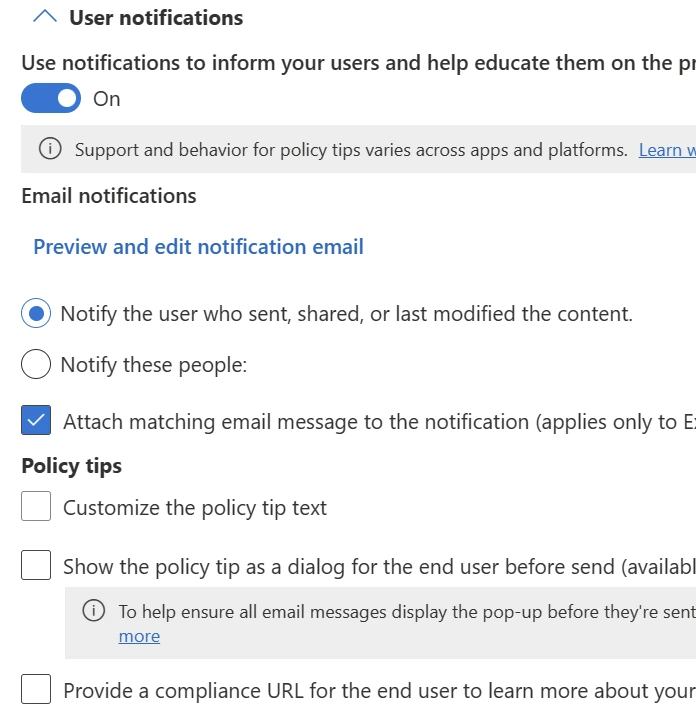
Pop-up policy tips appear to warn a person they may be sharing a sensitive item inappropriately.
- 2
Block or require a reason
Rules block a send directly, or let the person override the block by typing a business justification.
- 3
Stored file locked in place
Sensitive files sitting in storage are locked where they sit and moved to a secure quarantine location.
Data loss prevention policy rules in action
Pick a situation and watch what the rule does to an email or file match, shown beside Microsoft's own screen.
Select a situation
- 1
- 2
- 3
Microsoft 365 licenses
Microsoft 365 plans with data loss prevention
Business Premium includes office 365 data loss prevention for mail, SharePoint, OneDrive, Teams chat, Windows and Mac computers and on-premises file shares. Exchange Online Plan 2 includes it for mail only. Five other plans do not.
Prices are Microsoft list prices per user per month, paid yearly, checked November 1, 2026.
Records protected across different organizations
Predefined policy templates cover financial data, medical records and privacy data. Rules match on a count, such as ninety-five numbers emailed to an outside recipient.
Sensitive records handled
Policy actions
Locations monitored for sensitive records
Microsoft documents monitoring across Exchange email, sites, chat, devices and shares. Every monitored activity goes to the audit log and Activity explorer.
Steps to configure data loss prevention rules
- 1
Templates or rules written
Predefined templates cover financial, medical and privacy data. Custom rules are written for the records the office handles.
- 2
Simulation mode tests policies
Policies run in simulation mode first, with matches reported and no action taken.
- 3
Policies turned on
Rules are turned on and take effect about an hour later, acting on sensitive records.
- 4
Alerts and activity read
Administrators read alerts and monitor activity directly in Microsoft Purview.
Frequently asked questions
- What is Microsoft Purview data loss prevention?
Rules detect sensitive records leaving the company and act on them as they are typed, sent or shared. Warning, blocking and quarantining are three settings on one policy.
- Which Microsoft 365 plans include it?
Microsoft 365 Business Premium includes it for mail, SharePoint, OneDrive, Teams chat, computers and file shares. Exchange Online Plan 2 includes it for mail only.
- Does it read mail already in a mailbox?
New mail is read as it is sent. Mail already sitting in a mailbox or archive is not re-read.
- Can staff override a block?
Rules can allow overrides from Exchange, SharePoint, OneDrive and Teams. Staff type a written reason that is stored in the audit log and the email header.
- Does it work in Teams?
Messages that match a blocking policy show as blocked due to sensitive content. Senders can see what matched and type a justification if overrides are allowed.
- What does an office with file servers need?
On-premises file shares need the Microsoft Purview Information Protection scanner deployed to the share to scan and move sensitive files to a quarantine folder.
- Can it run without affecting anyone first?
Policies can run in simulation mode first. Matches are reported to administrators, but the actions in the policy are not applied.
Start managing sensitive records
Call CloudCentric at (844) 422-7000 or book a walkthrough to set up data loss prevention rules.