Local listing maintenance
Google Business Profile management for local businesses
CloudCentric keeps your Google listing accurate, posts regular updates and answers customer reviews so your company looks its best online.

Accurate local presence
Google Business Profile optimization done for you
Customers find your company by searching their phones. Keeping your profile fresh takes work. CloudCentric handles the details so your listing always shows correct information and active engagement.
- 1
Information kept accurate
Hours, address, phone number, photos and services stay up to date so customers always know exactly when and how to reach you.
- 2
Updates and offers posted
Posts go out on your listing to share announcements, special offers and events with people searching for your services.
- 3
Reviews monitored and answered
Customer reviews get public replies to show active engagement, notifying the reviewer and keeping your profile responsive.
Companies we support
Local business owners rely on accurate Google listings to reach customers. Setup and rules vary by industry, so we apply the correct structure for your operation.
Business type
Profile setup
Customer views on Google Search and Maps
People searching for local services see your Business Profile directly in their search results. CloudCentric maintains every section of your listing so customers find exactly what they need.
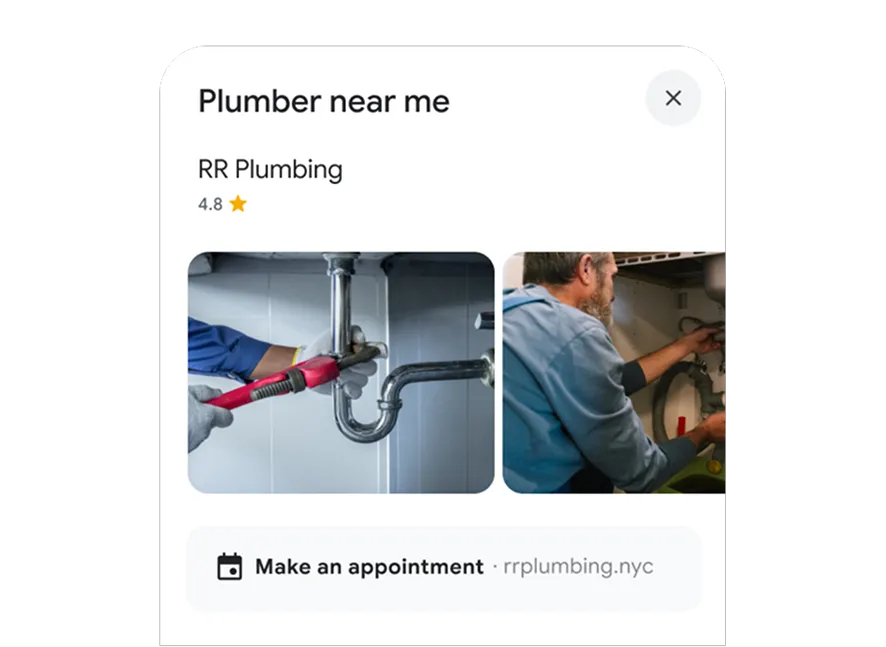
Strict Google guidelines enforced
Google enforces specific rules for every listing and suspends profiles breaking them. CloudCentric manages your profile to ensure every detail complies with current guidelines.
Steps to add your business to Google Maps
CloudCentric handles the entire setup process. Our team manages verification, corrects your details and maintains your listing going forward.
- 1
Claim and verify the profile
Google verifies ownership by phone, text, email, video or postcard. Postcards arrive within 14 days, codes expire after 30 days, and reviews take up to five business days.
- 2
Correct the details
Verification unlocks your ability to edit profile details. Address, hours, phone numbers and services receive comprehensive updates to match your actual business operations.
- 3
Post updates and offers
Regular posts go out to announce events, special offers and company news, keeping your local listing fresh for people searching nearby.
- 4
Answer reviews
Verified profiles allow public replies to customer feedback. Reviews on your listing are monitored and answered, with public replies appearing under the review as coming from your business.

Common questions about Google listings
- Is a Google Business Profile free?
Creating a Business Profile on Google is completely free. Google provides the platform to list your photos, reviews, posts, hours, contact information, products, services and booking options.
- Can a business with no storefront have a profile?
Service-area businesses that travel to customers can have a profile. Landscaping and plumbing companies simply hide their street address and list the areas they serve instead. Google guidelines suggest keeping the service area within a two-hour drive.
- What address does a profile need?
Google requires a physical location. P.O. boxes, rented mailboxes and virtual offices are prohibited unless staff are there during business hours. Service-area businesses hide their street address and list the area they serve instead.
- Why is a profile suspended?
Listings face suspension for violating Google guidelines. Google suspends profiles using virtual offices, rented mailboxes or P.O. boxes as a business address unless staff are there during business hours.
- How does Google Business Profile verification work?
Google confirms business ownership through phone, text, email, live video call, recorded video or postcard. Postcards usually arrive within 14 days with a code valid for 30 days. Google reviews the verification, which takes up to five business days.
- Are reviews answered?
Replies go directly to Google reviews and appear publicly as coming from your business. Google sends a notification to the reviewer. Offering incentives for reviews or asking only satisfied customers for them violates Google rules.
- What about rankings, results and prices?
Information about rankings, expected results, other directory listings or specific prices is not stated here. Call our team at (844) 422-7000 to discuss your specific needs and learn more about our managed services.
Keep your local listing accurate
Call CloudCentric to manage your Google Business Profile so customers always find correct information.