FTC Safeguards Rule
Requires covered businesses to provide personnel with security awareness training updated to reflect risks identified by risk assessments.
Non-bank financial businesses such as tax preparers.
16 CFR 314.4(e)(1)
Managed IT services
Harmless test emails and short training inside Microsoft 365 your staff already use, set up for offices from Charleston to Savannah.
Setup and review
CloudCentric sets your program up in Microsoft Defender, chooses your first campaigns with you, runs them, and reviews results. Your staff practice recognizing malicious messages safely.
Selected staff members receive realistic but safe phishing messages at their desks.
Anyone clicking a link or entering a password receives a short training assignment automatically.
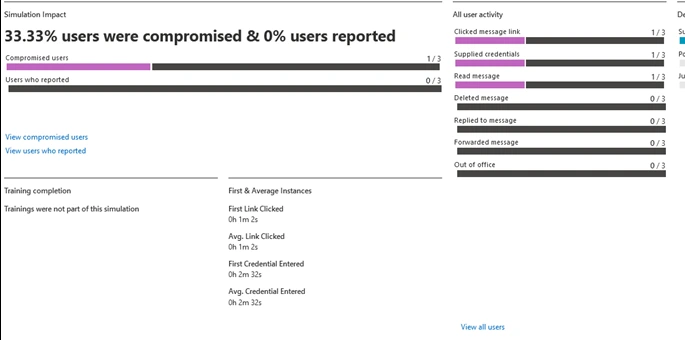
Reports show exactly who received messages, who reported them, and who finished their training.
Different businesses handle different kinds of sensitive information. Staff training covers realistic scenarios they face every day in their own inbox.
Inbox risks
Example test email
Written training rules
Common roles
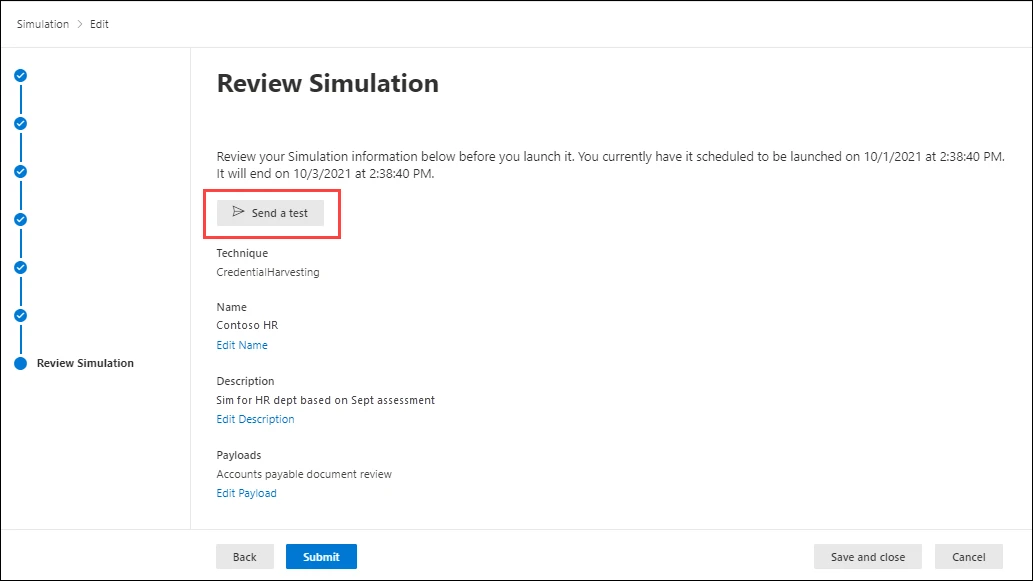
CloudCentric configures your campaigns using Microsoft's simulation wizard, guiding the process from choosing the technique to scheduling delivery times.
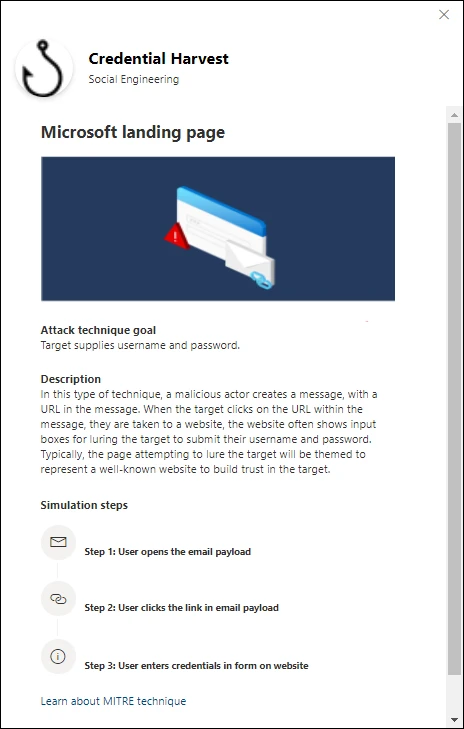
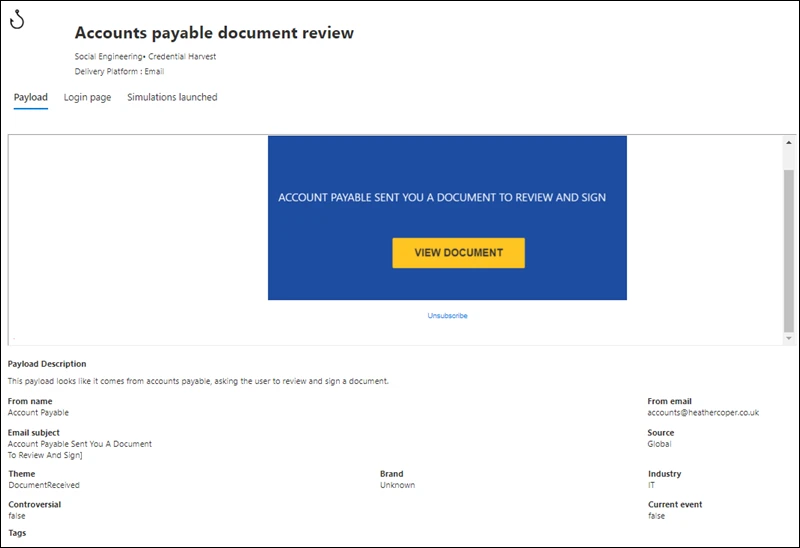
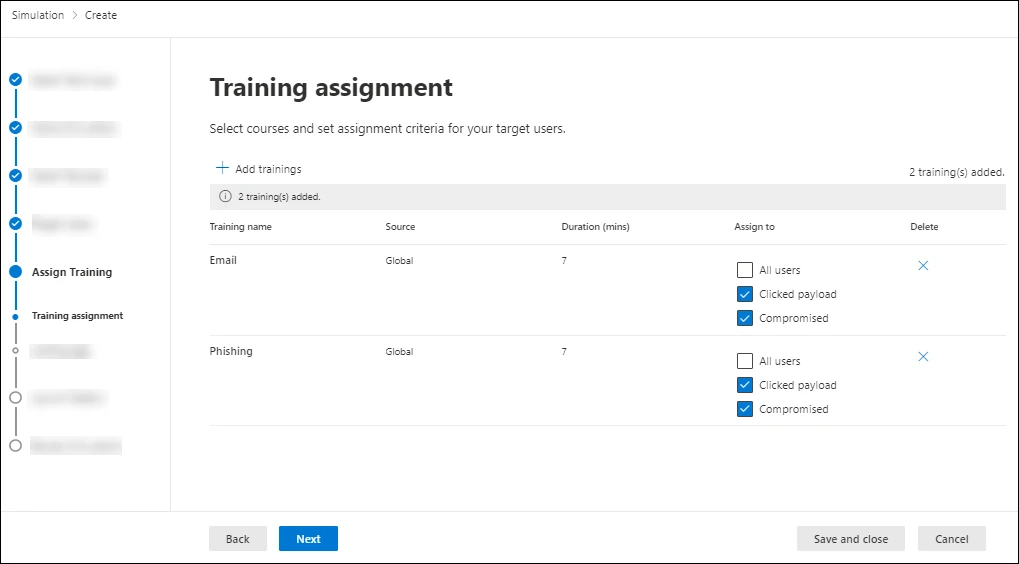
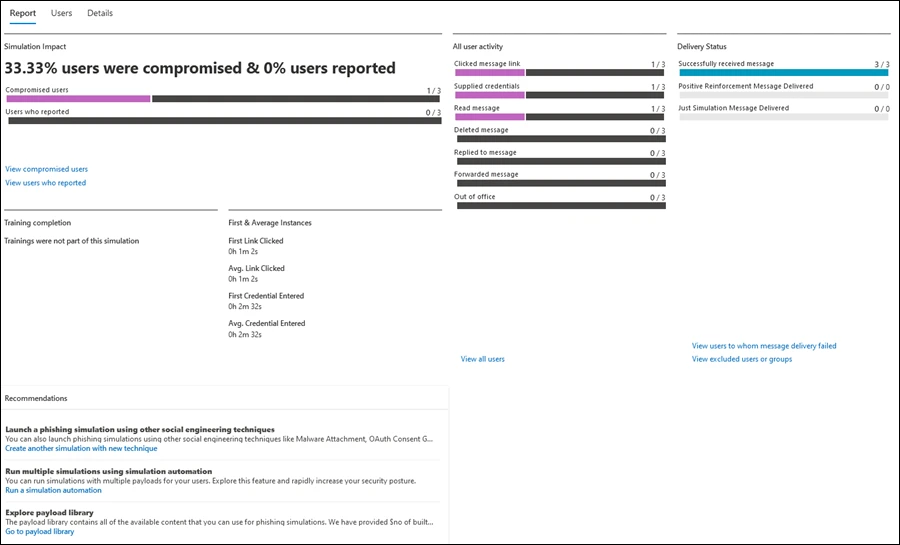
Microsoft Defender provides reports after a campaign runs. Tabs show counts of users who clicked the message link, supplied credentials, and completed training.
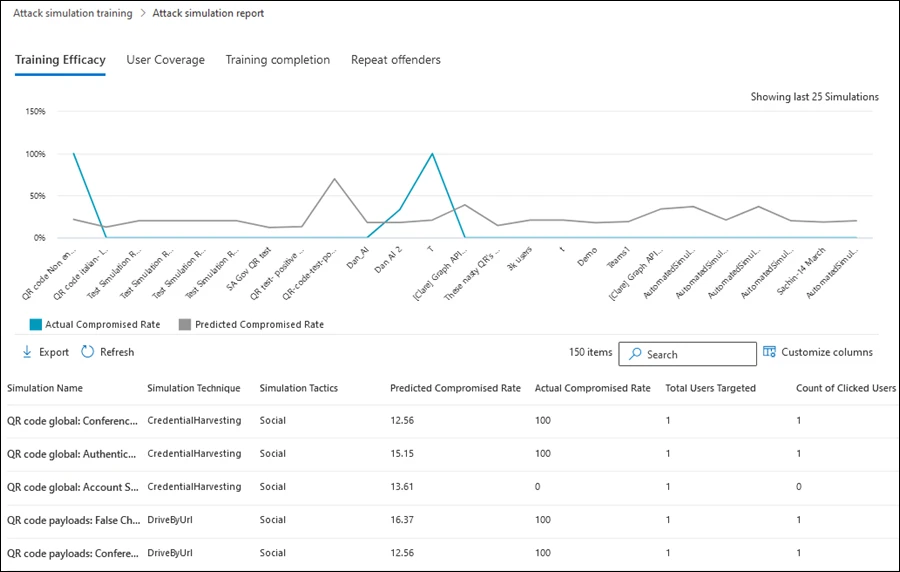
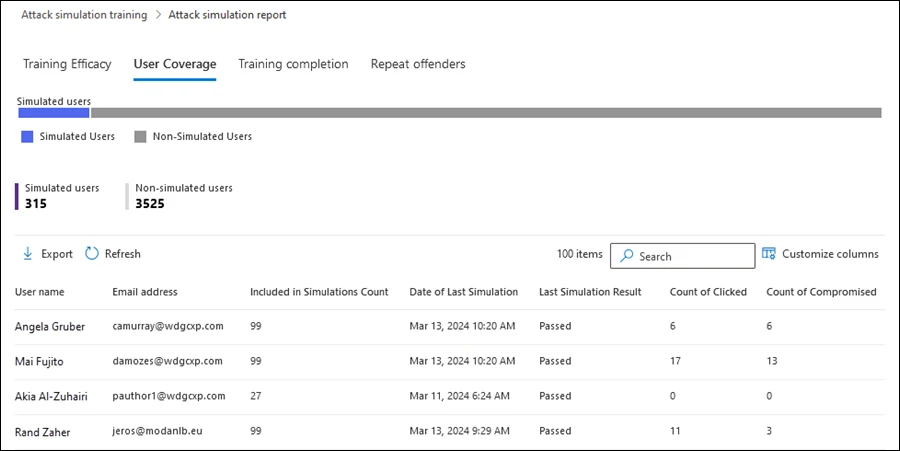
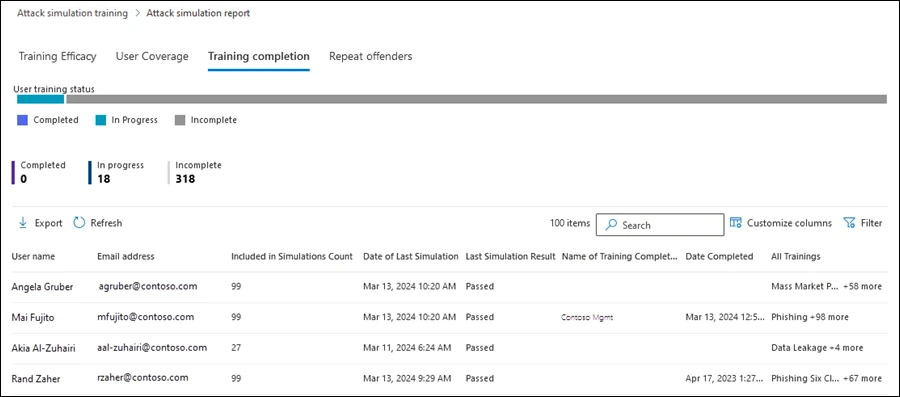
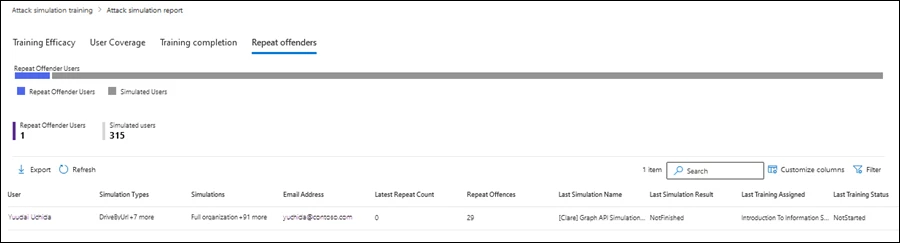
Regular training builds good habits. Monthly campaigns mix simulated phishing emails with short training modules, covering a variety of scenarios.
Example plan, not a fixed schedule.

Reporting messages
Reporting a suspicious email is the habit training builds. Microsoft 365 provides tools to encourage reporting and reinforce positive behavior when staff flag a test email.
Teaching guides with instructions arrive directly in the inbox, showing exactly how to report phishing messages.
Built-in training covers malicious digital and printed QR codes, including how to recognize and report them.
Thank-you notices can follow during or after the campaign, rewarding staff for reporting a test email correctly.
Several written rules name security awareness training for staff. Scope depends on your business, and training is one part of what rules ask.
Requires covered businesses to provide personnel with security awareness training updated to reflect risks identified by risk assessments.
Non-bank financial businesses such as tax preparers.
16 CFR 314.4(e)(1)Requires a security awareness and training program for all members of a covered workforce, including management.
Members of a covered workforce.
45 CFR 164.308(a)(5)Requires cybersecurity awareness training. Licensees with fewer than ten employees, including independent contractors, are exempt.
Licensed insurance businesses.
S.C. Code 38-99-20 and 38-99-70Asks for a formal security awareness program covering phishing and social engineering, reviewed at least every 12 months.
Businesses that handle payment cards.
Requirement 12.6Practices mention making managers and users aware of security risks, and giving awareness training on recognizing insider threats.
Defense contractors handling controlled unclassified information.
CMMC assessment guide, level 2Microsoft's library includes over 70 built-in training modules and multiple social engineering techniques. Staff encounter various realistic scenarios.
Links lead to a sign-in page asking for a username and password, themed like well-known sites.
Attachments that, when opened, would run code such as a macro in the background.
Documents contain a link leading to a sign-in page asking for credentials.
Links lead to a file on a well-known file-sharing site such as SharePoint or Dropbox.
Links point to a website that tries to run code in the background, known as a watering hole attack.
Messages ask the person to approve a malicious app's access to data such as the inbox.
Built-in or custom QR code payloads appear directly inside the message body.
Training modules explain the risks of malicious printed QR codes found in physical locations.
Short teaching guides arrive with instructions on recognizing and reporting suspicious messages.
Training-only assignments deliver short modules without a simulation, acting as regular refreshers.
Payload automation turns harmless copies of real phishing messages detected by Microsoft 365 into simulations.
Identical simulations scoped by department allow you to compare reports and see which teams are more exposed.
Reports list people caught out twice in a row, allowing you to assign specific training modules.
Region-aware time zone delivery sends messages to users during their regional working hours.
CloudCentric guides your office through the entire process, ensuring campaigns run correctly inside your existing Microsoft 365 tenant.
Attack simulation training requires Microsoft Defender for Office 365 Plan 2 or Microsoft 365 E5. CloudCentric checks your license first.
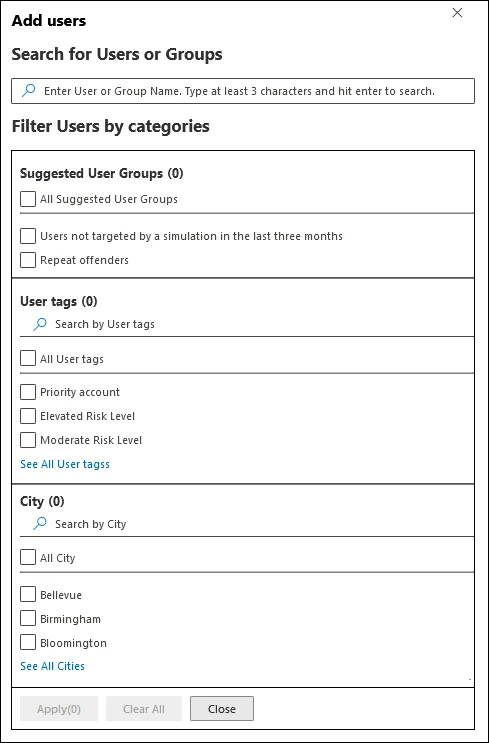
Users and groups are targeted. Specific people can be included or excluded from receiving messages and training.
CloudCentric chooses the first test emails and training with you, selecting from built-in payloads or custom options.
A test email can be sent to us before launch.
Campaigns launch on schedule. CloudCentric reviews the results with you, examining click rates and training completion.
Attack simulation training needs Microsoft Defender for Office 365 Plan 2 or Microsoft 365 E5. These can be add-ons or included in subscriptions. CloudCentric checks your license first.
Yes. Simulations deliver realistic but harmless phishing messages to your chosen users. They look like real threats but contain safe links and attachments.
Yes. Training campaigns are training-only assignments. Users get training directly without a simulation, using over 70 built-in training modules.
CloudCentric sets the program up and reviews the results with you. Reports show exactly who clicked, entered credentials, and completed training.
Each rule states its own scope. FTC, HIPAA, South Carolina Insurance Data Security Act, PCI DSS, and NIST name training. Training is one part of what they ask.
Yes. Microsoft has built-in QR code payloads and lets a business create its own. Built-in training covers malicious digital and printed QR codes.
Yes. Users can be excluded during setup. Targeting allows searching for specific users or groups, or importing a list.
Call (844) 422-7000 or book a walkthrough with CloudCentric today.