Month-to-month spend
Spending is tracked month to month so increases are noticed early.

Tracking Azure bills
Bills are read by service and owner, budgets and alerts are set, and unused resources are found month to month.
Business leaders review spending patterns and track resource costs month to month across multiple departments and projects.
Reviewed month to month
Analyzing resource spend
Spending is tracked month to month so increases are noticed early. Bills are read by service, resource group and owner to clarify exactly where money goes.
Cost analysis shows accumulated spending for a period, broken down by service name, location and resource group.
Tags let cost analysis group bills by owner or environment. Untagged cost is shown as its own line.
Spending is tracked month to month so increases are noticed. Resources that cost money but remain unused are found.
Microsoft Cost Management is built into Azure for analyzing spend. Read access lets owners view accumulated costs and forecasts.
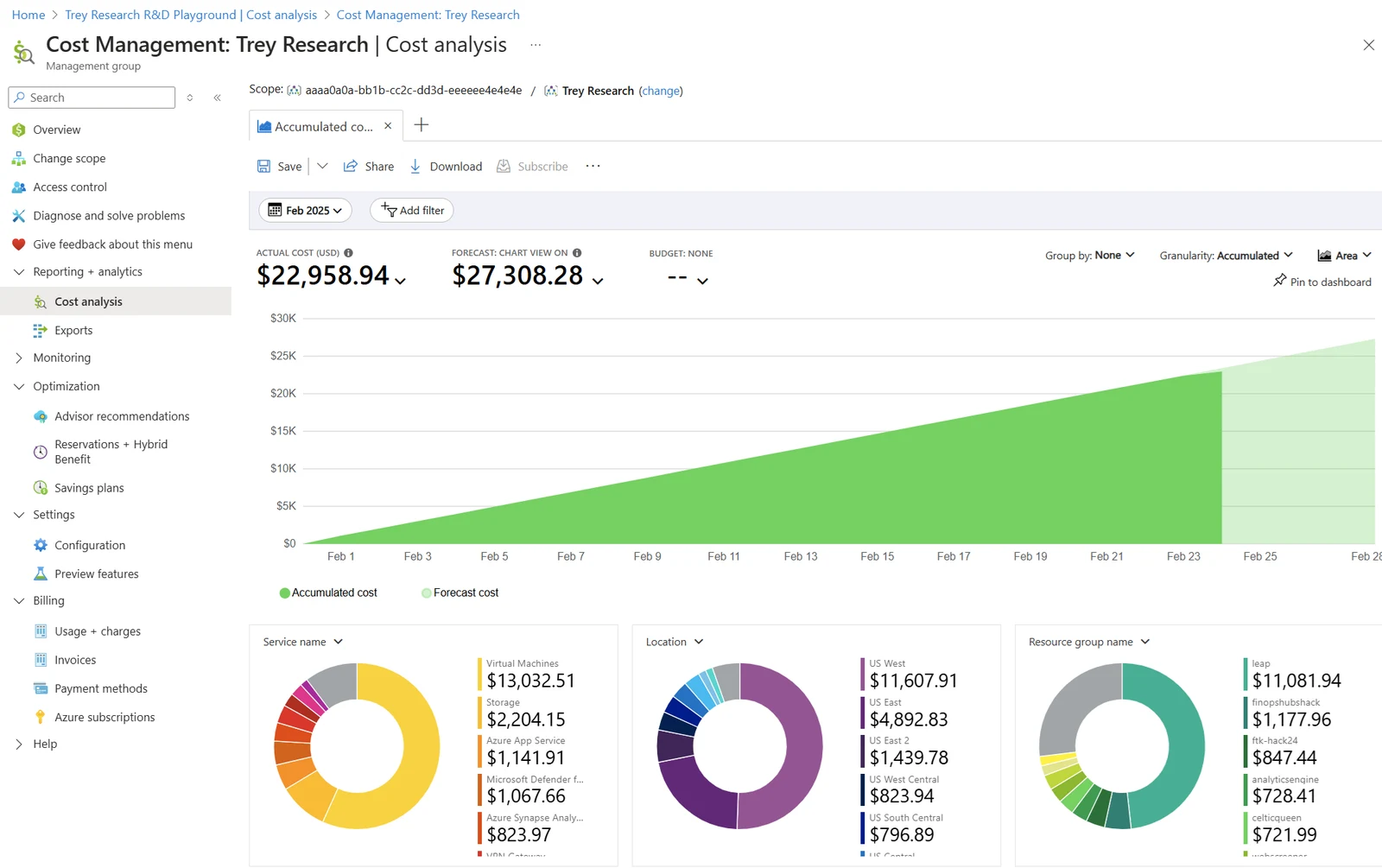
Screenshots are Microsoft documentation example screens, not customer accounts.
Azure cost and usage data typically arrives hours after use. Budgets are evaluated daily against accumulated data, serving as an early warning rather than a live meter.
Review data timeline
Exists at this point
Meaning
Timings are Microsoft published estimates for data arrival.
Azure Advisor and Cost Management give commitment recommendations based on actual eligible usage to manage monthly server costs.
To know
Reviewed when
Spending is analyzed and unused resources are found. Azure Advisor recommendations guide adjustments to virtual machines and storage.
Spending is tracked month to month so increases are noticed early.
Resources that cost money but are no longer used are found and shut down.
Tags let cost analysis group bills by department to clarify spending.
Budgets are set per subscription, resource group or management group.
Budget alert conditions are set on forecasted spend to notify administrators.
Action groups send push notifications directly to Azure mobile apps.
Anomaly alerts send emails showing resource groups whose cost changed most.
Azure Advisor recommends resizing or shutting down underutilized virtual machines.
Commitments are evaluated against actual eligible usage month to month.
Existing server licenses are applied to Azure preventing double payment.
Azure cost calculator estimates services before they are set up. Azure pricing calculator
CloudCentric reads bills and manages tags month to month. Alerts notify administrators of spending changes based on forecasts.
Cost analysis shows accumulated spending for a period, breaking down costs by service name, location and resource group.
Labels split bills by department or project to clarify exactly who uses each server.
Budgets trigger action groups to send emails or push notifications when spending crosses thresholds.
Shutdown recommendations are applied to resources that were not used at all over lookback periods.
Azure Advisor commitment recommendations are reviewed against actual eligible usage month to month.

Microsoft Cost Management is built into Azure for analyzing spend. There is no charge to use Cost Management and Billing features for Azure subscriptions.
Azure cost and usage data typically arrives eight to twenty-four hours after use. New subscriptions can take up to forty-eight hours before features appear.
Budgets are evaluated against data every twenty-four hours, so budgets serve as early warnings rather than real-time meters.
Anomaly detection compares daily spend for a subscription with forecasts built from previous days. Checks run about thirty-six hours after each day ends.
Reservations are commitments to specific resources like compute. Savings plans are commitments to fixed hourly amounts across eligible compute usage in any region.
Savings plan purchases cannot be canceled or refunded. Unused hourly commitments expire and do not roll over.
Azure Hybrid Benefit lets Windows Server and SQL Server licenses businesses already own apply to Azure. Call us to review eligible licenses.
Call CloudCentric to read bills by service and set budgets for local businesses.