Questions answered after hours
Visitors get answers to their questions outside your normal business hours.
Website chat assistant
Answer visitors' questions on your website at any hour from your own content, and let a person take over.
After-hours answers
A chat window on your website answers visitors from your own services, hours and policies, including after hours, and a person can take over when needed.
Opening greetings can be set to tell visitors at the start of the chat that they are talking with an automated assistant.
Answers come from your own website pages and documents, and any question outside them brings up contact details or hands the chat to your staff.
Staff members take over the conversation when needed, reading the full history of what was already said.
Visitors ask your website questions again and again, often when nobody can answer. An AI chat assistant handles inquiries using facts drawn only from your content.
Call for details
Work handled by chat
Visitors ask different kinds of questions. See how a website chat handles an after-hours question, a policy question, an unanswered question, and a request for a person.
Pick one
Information kept
Handling rules
Questions, names and fields shown are examples.
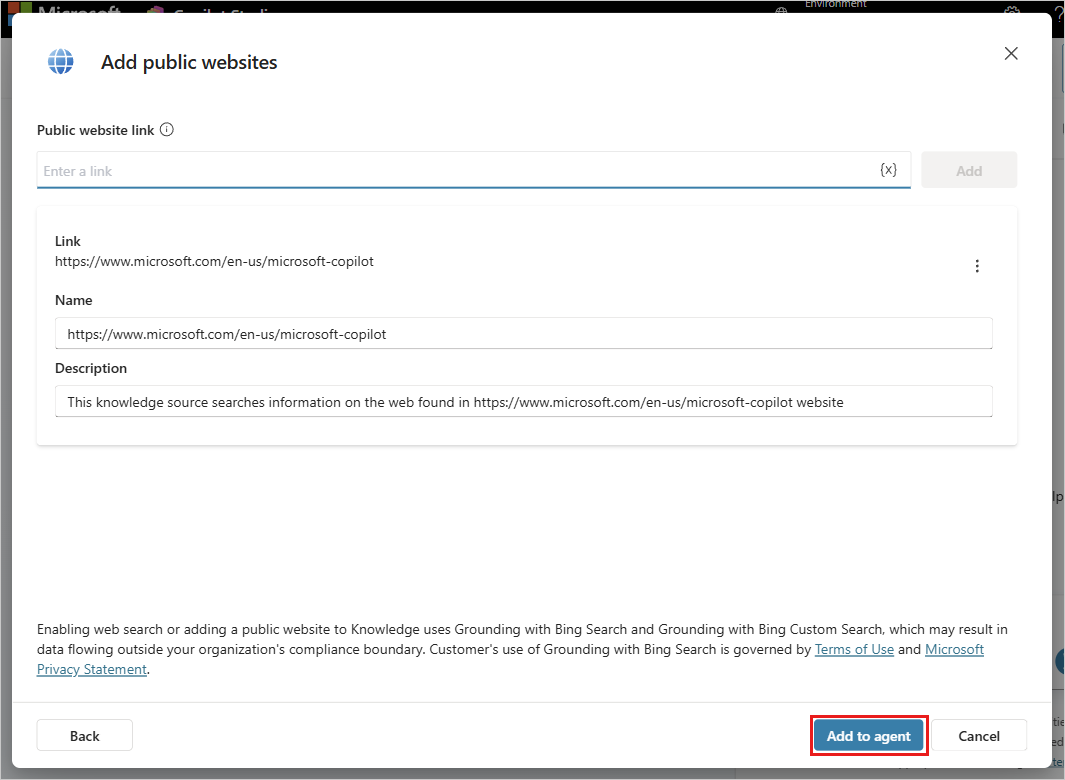
Administrators see how platform tools handle your knowledge sources and track answered questions, with Microsoft Copilot Studio serving as an example of what such a platform does.
Chat features cover everything from reading your current pages to handing off a conversation to your team.
Visitors get answers to their questions outside your normal business hours.
Customers find out when you open and where you are located.
Clients learn about your offerings and the towns you serve.
Shoppers and guests read your exact rules for returns, shipping and booking.
Information comes directly from the public pages you already maintain.
Fact sheets and uploaded documents supply additional answers for visitors.
Visitors see a link to the exact page an answer comes from.
Inquiries about things not on your website bring up contact details or hand off to a person.
Staff members step into a conversation with the full context already there.
Conversations handed to a person are labeled as escalated in your records.
Analytics reports track answered and unanswered questions, and score sampled answers.
Staff tests the chat on a private page before it goes live to customers.
Read your chats
Questions answered and questions missed are reviewed by your team. When a question has no answer, the fix is simply to add that missing answer to your own content.
Your website and documents are the source of every answer the chat provides to your visitors.
Missed questions show you exactly what details to add to your site so the next visitor finds them.
Generated answers get a score from a sample, letting you check their quality on a regular basis.
Development starts from your website and uploaded documents and goes live directly in a chat window. Work is run from Mount Pleasant, South Carolina, for businesses from Charleston to Savannah.
Engineers gather facts from your existing pages and upload your reference documents.
System settings are configured to guide the assistant and map out the hand-off to a person.
Your staff gets a private demo page to try out the chat before any customers see it.
Code goes onto your live website and you begin reviewing the questions visitors ask.
Answers you stand behind
Businesses answer for what their chat says the way they answer for their website, so the content has to be complete and current at all times.
In 2024, a Canadian tribunal held Air Canada liable for wrong refund information its website chatbot gave a customer, and rejected the argument that the chatbot answered for itself.
Opening greetings can be set to tell visitors at the start that they are talking with an automated assistant, just as California bot disclosure law expects when influencing a sale.
Websites need a privacy policy that covers names, emails and phone numbers collected through chat.
An AI receptionist answers a business's phone calls after hours and at busy times.
See the AI receptionistAnswers come strictly from your own website pages and documents. Microsoft Copilot Studio can use up to twenty-five public websites and uploaded files as knowledge sources.
Questions outside your provided content bring up contact instructions or hand the visitor to a person without the assistant attempting a guess.
Yes, a person can take over. The full conversation history is sent to your staff, so a live agent reads the context and continues the conversation.
Analytics cards report on total questions and score sampled answers for quality. Because the assistant only knows what is in your content, your website must be complete and current.
Yes, the chat assistant is added to your live website with a code snippet. The website can be external or an internal SharePoint site.
A business is answerable for what its chat assistant tells customers, in the same way as for what its website says.
Contact us for a short readiness review. The review costs nothing and is answered in writing, giving you a clear picture of how to proceed.
Call (844) 422-7000 to get answers flowing.