Single email
Bringing back one specific email deleted from a mailbox.

Managed IT services
A backup stored separately from Microsoft 365 lets an item be restored after Microsoft's window has passed.
Separate data storage
Microsoft's built-in retention and recycle bins keep deleted items for a limited window. After Microsoft's window passes, data is gone permanently unless a separate copy exists.
Exchange Online mail, SharePoint, OneDrive and Teams data are captured and stored in a separate system outside Microsoft.
File versioning and the recycle bin sit inside the same tenant as the files. Ransomware or a compromised admin account can destroy both at once.
A backup stored separately allows an item to be restored long after Microsoft's built-in retention window has passed.
Microsoft keeps deleted items for a limited number of days. Dragging the slider shows whether Microsoft can still restore an item, or if a separate copy is needed to bring data back.
Days since deletion
Days count from deletion, and the backup column applies to items captured before deletion.
Owners and office managers across Charleston rely on Microsoft 365. Selecting an organization type shows the kind of restore typically requested and Microsoft's retention window for those items.
Typical restore request
Microsoft retention window
Restoring requires picking a data type, choosing a restore point, and selecting the items. A person carrying out the restore can pick a single email, a file, a folder, or a whole mailbox.
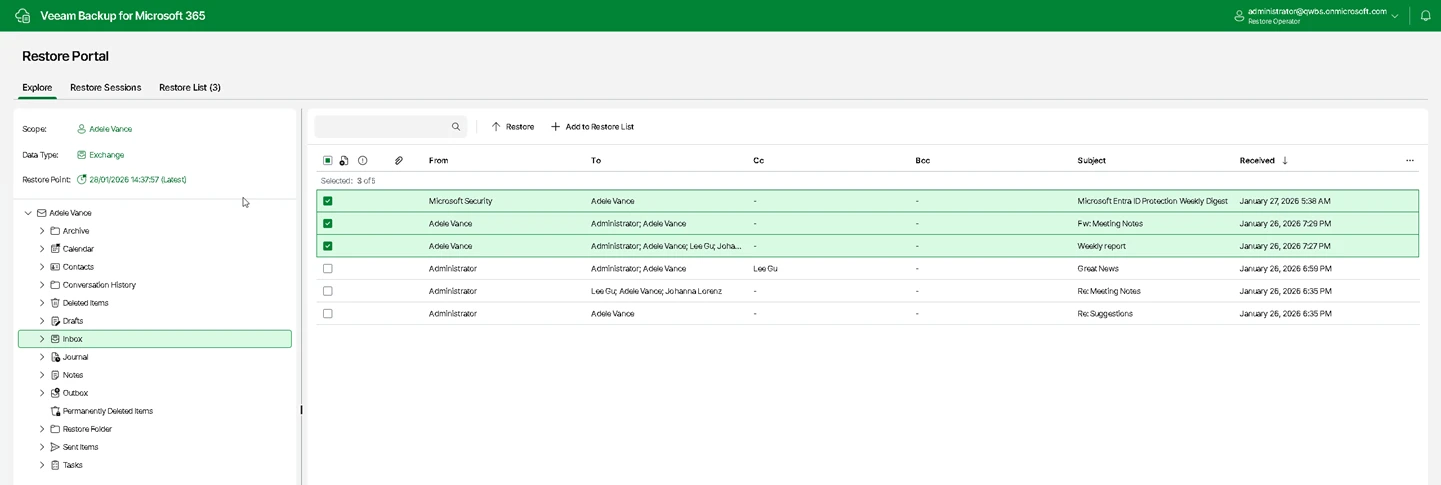
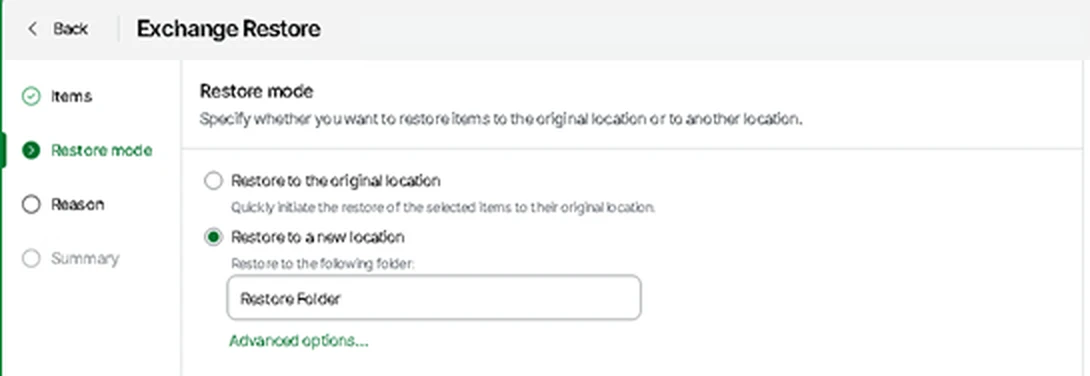
Items can be restored directly back to their original location in Microsoft 365, or placed into a new location such as a separate folder.

A departed employee's mailbox is among the most requested restores, usually months later. Capturing data requires the correct order of events before a Microsoft 365 license is removed.
Restores are tested, not assumed. Bringing data back can mean retrieving a single file or recovering an entire site.
Bringing back one specific email deleted from a mailbox.
Recovering one specific document from a SharePoint library or OneDrive.
Restoring a complete folder full of documents to its original location.
Recovering an entire mailbox with all its folders and messages intact.
Restoring an entire SharePoint site and all its contained document libraries.
Retrieving a former staff member's mailbox months after they have left.
Recovering specific posts from a channel using Microsoft Graph Teams Export APIs.
Placing restored items into a completely new folder instead of their original place.
Exchange Online, SharePoint, OneDrive and Teams are covered by Veeam Backup for Microsoft 365.
Backup, security monitoring and remediation run on Microsoft Azure alongside Microsoft Defender and Microsoft Sentinel.
Leavers are captured before the Microsoft 365 license is removed from their account.
Restores are tested to ensure data comes back correctly, not just assumed.

Veeam can write Microsoft 365 backups to multiple destinations.
Writing backups to local disks or on-premises network storage.
Storing data within Microsoft Azure object storage.
Utilizing popular object storage services like Amazon S3 and Wasabi.
Sending backups to other S3-compatible object storage services.
Microsoft provides built-in retention and recycle bins for a limited window. File versioning and recycle bins sit inside the same tenant as the files. A separate backup outside Microsoft 365 is required to protect data.
Exchange Online keeps deleted email for 14 days by default. An administrator can raise this window to at most 30 days. After that window passes, data is permanently gone without a separate backup.
SharePoint keeps deleted files in its recycle bins for 93 days from the moment of deletion. Microsoft then removes them completely.
File versioning is not a backup. SharePoint versioning and the recycle bin sit inside the same tenant as the files, meaning ransomware or a compromised admin account can destroy both at once.
Microsoft 365 keeps a deleted user account mailbox for 30 days before permanently purging it. Capturing the mailbox requires a backup to run before the Microsoft 365 license is removed.
Veeam Backup for Microsoft 365 covers Exchange Online mail, SharePoint sites, OneDrive files and Teams posts. Backup data is captured and stored outside of Microsoft's built-in retention systems.
Backups can be written to local or network storage, Microsoft Azure Blob Storage, Amazon S3, Wasabi, or other S3-compatible storage services.
Call (844) 422-7000 or book a walkthrough to set up a separate Microsoft 365 backup for your organization.