
Managed IT services
SharePoint intranet setup for your business
Give your team a central home page for company news, policies, and files they can reach from a desk or phone.

Central company files
SharePoint organizes your company communication
A proper setup gives your staff one home page for company news, policies, and shared forms. Connected behind your main page are individual sites for each team or department, organizing your business communication for access from desks or phones.
- 1
Sites built for your company
Custom home page and team sites reflect your specific workflows, keeping related forms and project files together.
- 2
Permissions correctly assigned
Access settings ensure authorized staff can edit pages while other employees can only read company announcements.
- 3
Publishers trained and files moved
Staff members receive training on publishing updates, and your existing files move directly into your new system.
Intranet designs for your industry
Different businesses need different structures. Choose your field to see exactly what an intranet holds for your staff, including specialized team sites and appropriate permission levels.
Select your business type
Explore related IT services
SharePoint offers three foundational site types
Microsoft provides three foundational blocks. They share a common structure but serve different purposes, creating a network of locations connected by navigation, theme, and search capabilities.
Select a site type
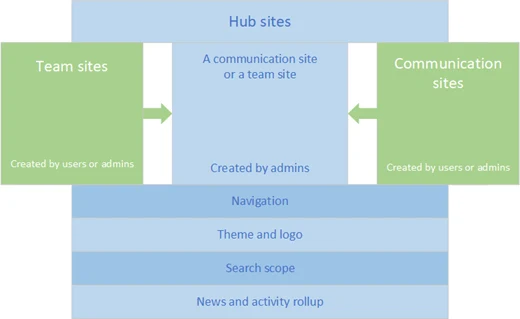
Purpose
Authors and readers
Permissions
Microsoft Learn: planning your SharePoint hub sites. Checked November 2, 2026.
Customizing a SharePoint intranet template
Microsoft templates offer pre-built starting points shaped to your company. Applying a template to an existing site keeps your original pages safe in Site contents while adding a new default layout.
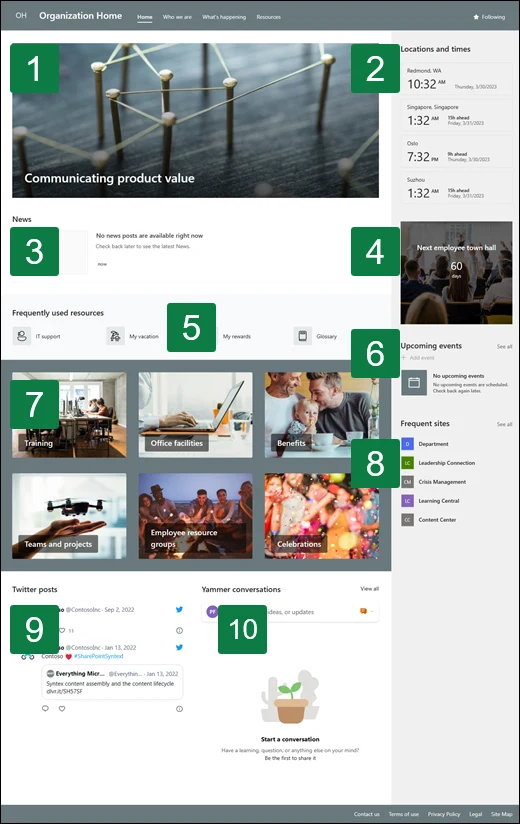
Select a numbered component
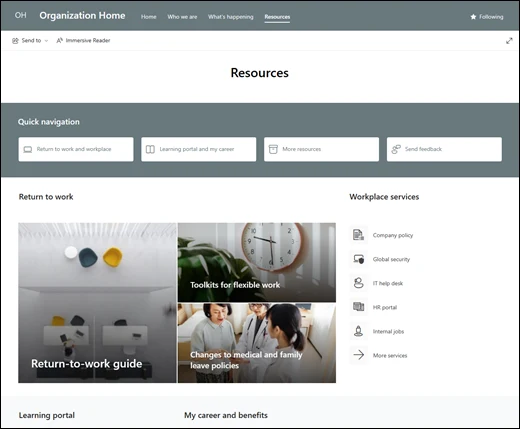
Read Microsoft documentation, applying site templates. Checked November 2, 2026.
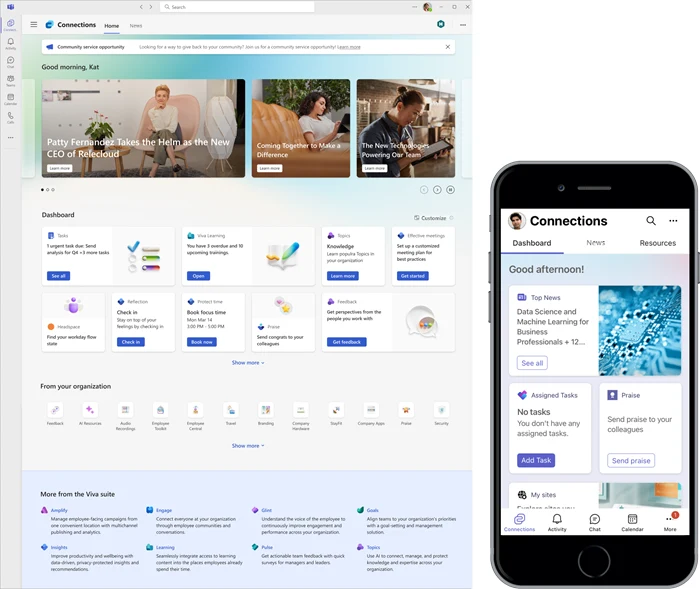
Viewing SharePoint on a phone or desktop
SharePoint applications in Microsoft Teams bring your home site to mobile devices. Staff can check announcements, review paystub information, and use interactive cards directly within main communication tools.
News updates
Company announcements and news updates reach employees directly in desktop or mobile applications.
Interactive dashboard
Adaptive cards let staff clock in for shifts, open training materials, and book a shuttle.
Company resources
Application components deliver company resources directly to workers on desktop computers or mobile devices.
Professional SharePoint consulting and setup
Organizing your site structure must happen before migrating any documents. Clear planning connects your home page and team sites.
- 1
Sketch main pages
Planning sessions with your designated site owners map out a central home page and connected team sites.
- 2
Build templates and navigation
Setup applies Microsoft templates to your pages and connects related sites together with shared navigation.
- 3
Set access and permissions
Security rules dictate approved personnel can edit pages while regular staff only read them.
- 4
Train staff and move files
Publishers learn system basics while existing files migrate directly into your new team sites.
Existing file shares migrate using free Microsoft tools. Our page on moving files explains user permissions and size limits.
Read about file migration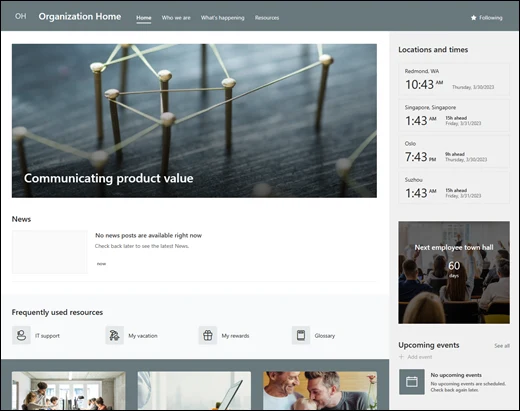
Frequently asked questions
- What is a SharePoint intranet?
A central home page and connected team sites where businesses store company news, policies, forms, and project files for staff to reach from desks or phones.
- Do we need hub sites?
Hub sites create a shared experience for a family of related sites. They provide shared navigation, branding, and news roll-up without changing existing permissions.
- Can staff reach it from a phone?
Microsoft Teams includes a SharePoint app delivering news, dashboards, and resources directly to mobile devices or desktop computers.
- What happens to the pages already on a site when a template is applied?
Applying a template creates a new default home page. Existing pages, libraries, and lists are kept safe and remain accessible in Site contents.
- Who can edit and who can only read?
Site owners and members hold editing permissions. Communication sites typically have small numbers of authors and large numbers of readers assigned through SharePoint groups.
- Can existing file shares move into it?
Local and network file shares migrate using free Microsoft SharePoint Migration Tools. Permissions carry over where on-premises users match Microsoft 365 users.
Ready for organized company files
Book a conversation to discuss your intranet needs.