Managed IT services
Daily website backup for your business
CloudCentric copies your files and database every day, keeps them off the web server, and puts your WordPress site back to an earlier day when something breaks.
WordPress backup
Your files and database go to remote storage
A WordPress site runs on files and a database. CloudCentric copies both halves every day, because files without a database lack content, and a database without files lacks a design.
- 1
Files and database together
UpdraftPlus backs up the WordPress themes, plugins, uploads and the database that holds your pages and posts.
- 2
Copies stay off the server
Backups are stored somewhere other than the server your website runs on, so a lost hosting account does not take the backups down with it.
- 3
Sites roll back to an earlier day
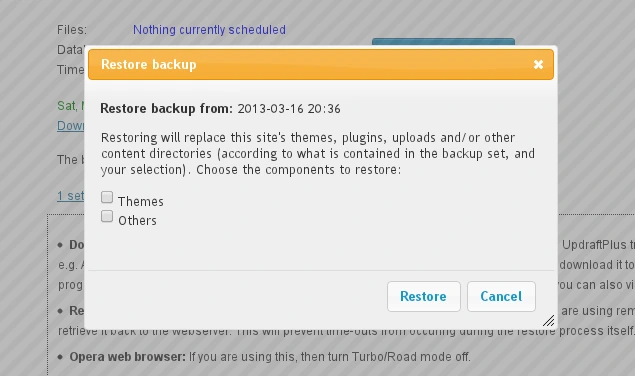
A technician restores your site to an earlier day after a bad update, a hacked file or an accidental deletion.
A technician restores your broken site
You choose what went wrong, and CloudCentric puts your site back to work. UpdraftPlus lets a technician pick exactly which parts to roll back.
Pick what went wrong
Resolution steps
- 1
- 2
- 3
Local businesses run real work on WordPress
A business depends on its website for operations. CloudCentric backs up files and databases for organizations across the Charleston to Savannah coast.
Site contains
Routine restores
Remote storage separates backups from the site
A backup stored on the same server as the site goes down with it. UpdraftPlus sends copies to remote storage, so your files and database remain available when a web host disappears.
- 1
- 2
- 3
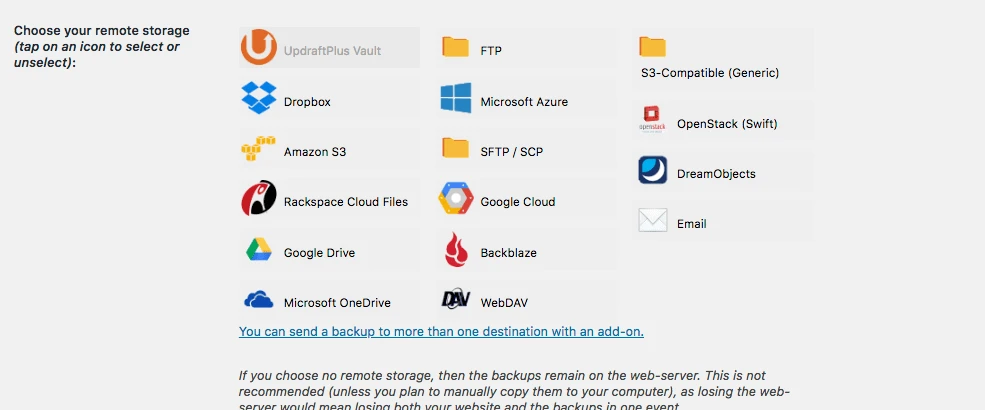
UpdraftPlus settings screen lists remote choices
UpdraftPlus offers many remote storage destinations. A technician configures the plugin to send copies to one of these services.
Google Drive
UpdraftPlus sends backups to Google Drive accounts.
Dropbox
UpdraftPlus places files and databases into Dropbox folders.
Amazon S3
UpdraftPlus writes website copies to Amazon S3 buckets.
Microsoft OneDrive
UpdraftPlus stores backups in Microsoft OneDrive.
SFTP and FTP servers
UpdraftPlus transfers backup files to standard file servers.
Azure, Google Cloud and Backblaze
UpdraftPlus connects to other cloud storage providers.
Backup a WordPress site every day
- 1
Files and database copy daily
UpdraftPlus backs up themes, plugins, uploads and the database every day.
- 2
Copy travels off site
UpdraftPlus sends the backup to remote storage away from the server.
- 3
Technician picks restore parts
A restore brings back only the parts your site needs.
- 4
Owner changes compromised passwords
You change the cause after a hack, so attackers cannot use the same way in.
Related managed IT pages
Common questions about WordPress backups
- What does a website backup include?
UpdraftPlus copies the WordPress files, which include themes, plugins and uploads, and the database that holds your pages, posts and settings.
- Where is the backup kept?
Backups are stored in remote cloud storage such as Google Drive, Amazon S3, Dropbox or OneDrive, away from the server the website runs on.
- Can I get back just one plugin or one page?
A technician restores only the plugins folder or only the database. One broken plugin rolls back without undoing your pages.
- What if my site is hacked?
A technician rolls back your site to an earlier day. You then change the plugin, theme or password the attacker used so they stay out.
- Can the backup move my site to a new server?
UpdraftPlus uses the same backup to move or clone a site. A technician restores your files and database onto a new server.
- Does the backup cover my domain name and DNS records?
A website backup is separate from your domain name and DNS records. Your domain registrar holds those records.
- Who do I call when the site breaks?
You call CloudCentric at (844) 422-7000. Help desk requests also arrive by email or Microsoft Teams, and each becomes a ticket.
Daily backups for your WordPress website
CloudCentric stores copies of your files and database away from the server every day.