Microsoft AI setup
Local Microsoft Copilot consultant for professional practices
Copilot set up for practices that handle patient and client records, with who can see what settled first.
Access and controls
Folder access guides every Copilot answer
Copilot answers from what each person can already open, so practice leaders decide who may see what and CloudCentric sets up and checks access before anyone enters a prompt.
Practice decisions
- Decides which staff get Copilot
- Decides which folders each person may open
- Reads every answer before it goes to a client or patient
CloudCentric setup
- Reviews folder and team access
- Sets up Copilot controls, Purview history search and retention
- Connects practice files so Copilot can reach them
Setup for professional offices
Professional practices require exact permissions over patient and client records. Microsoft offers tools for data boundaries, and CloudCentric configures them for your daily workflow.
Role constraints
Facts from Microsoft AI documentation
Microsoft outlines policies for search history, data boundaries and where queries are processed, and your setup depends on those configuration choices.
Copilot policies are stated by Microsoft, while Foundry details show specific application examples.
Copilot controls and meeting recaps
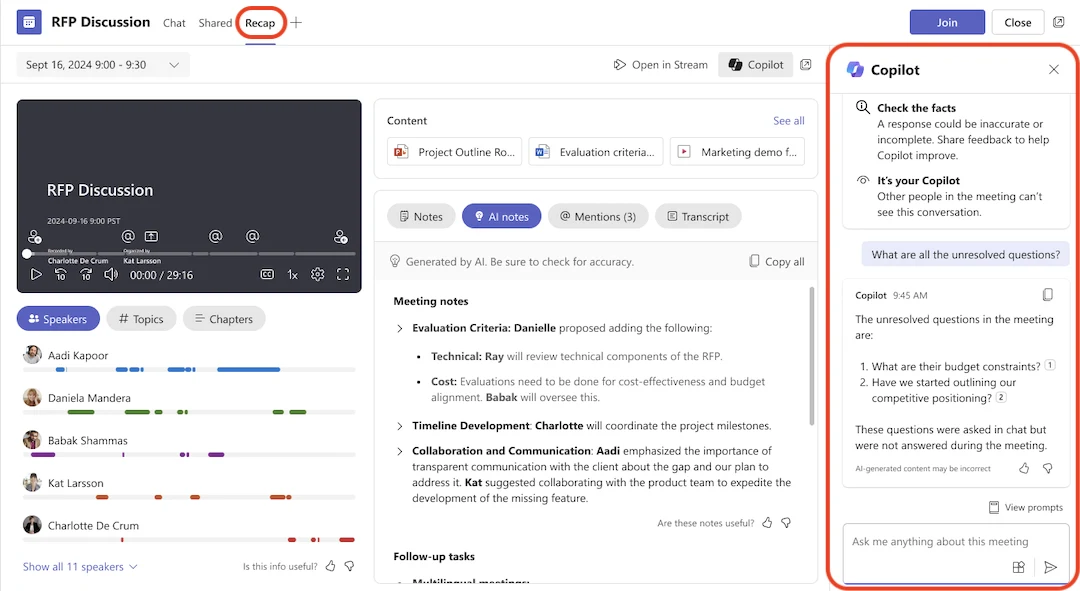
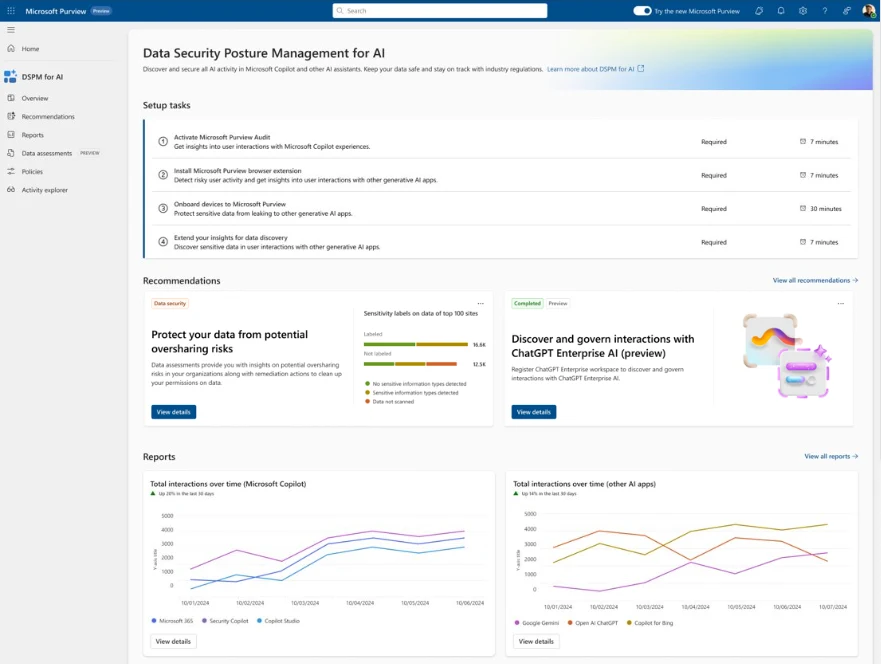
Copilot answers in Teams meeting recaps, and Purview shows oversharing recommendations and AI activity across the practice.
Teams meeting recap with AI notes and a Copilot pane answering what unresolved questions were.
Purview Data Security Posture Management for AI shows setup tasks, oversharing recommendations and charts of interactions over time.
Screens shown are Microsoft's own documentation samples from Microsoft Support and Microsoft Learn.
Setup path for Microsoft AI
CloudCentric handles setup in exact stages, beginning with access checks before any tool is turned on.
- 1
Copilot readiness assessment
A readiness assessment starts with who can open which folders, because Copilot answers from whatever a person can already open.
- 2
Review who can open what
Microsoft tells administrators to use the permission models in Microsoft 365 services such as SharePoint so the right people have the right access to the right content.
- 3
Confirm agreements and retention
Administrators verify the Business Associate Agreement is in place and set retention policies for activity history in Purview.
- 4
License a first group
CloudCentric sells Microsoft 365 licenses and sets up Copilot for a small initial team, often starting with tasks staff are already pasting into consumer chatbots.
- 5
Staff guidance and review
Copilot answers are read by a person before anything goes to a client or patient, keeping human oversight.
Questions from practice administrators
- Is Microsoft Copilot HIPAA compliant?
Microsoft makes its HIPAA Business Associate Agreement available by default, naming Copilot in scope. Microsoft states a business associate agreement alone does not make an organization HIPAA compliant and the practice remains responsible for its own controls and processes.
- Does Copilot use our practice data to train models?
Microsoft states that Microsoft 365 Copilot prompts, responses and data accessed through Microsoft Graph are not used to train foundation models.
- Who can see what Copilot answers from?
According to Microsoft, Copilot only surfaces organizational data to which an individual user already has at least view permission.
- Where are Copilot prompts and responses kept?
Prompts and responses are stored as Copilot activity history and encrypted while stored. Administrators can view them with Content search or Microsoft Purview.
- What is Microsoft Foundry and how does it differ from Copilot?
Foundry is a separate Azure service for building AI applications over a firm's own document store, rather than a chat product. It has different defaults, including available abuse monitoring and global processing choices.
- Where can I find the Copilot product tour and prices?
Product tours and Microsoft's prices are shown on the Microsoft 365 Copilot page, and CloudCentric sells licenses and sets up Copilot for professional practices.
Set up Microsoft Copilot for your practice
Call CloudCentric or book a walkthrough to check your folders and start your Microsoft Copilot readiness assessment.