Older scanner compatibility
Legacy scanners lacking 802.11r support operate on a dedicated WPA2 network with Protected Management Frames disabled, leaving modern devices on Fast Roaming.

Coastal facility coverage
Coverage planned aisle by aisle for scanners, forklift tablets and label printers, with dock doors and the yard covered too.

Aisle signal design
Racking and stored stock absorb and block signal. Access points go where aisles run, and a survey with a meter measures warehouse wi-fi strength before and after installation.
Racking and stored stock block radio signals. Surveys with a meter measure signal strength before and after placing radios along aisle lines.
A forklift or handheld scanner moves between access points all shift. Fast Roaming speeds the hand-off between access points as devices move.
Cat6 runs to a switch that supplies power over Ethernet. Hardware is bought once with zero management software license fees.
Layouts, storage height and outdoor work dictate network design across coastal South Carolina and Georgia industrial sites.
Facility profile
Key requirements
Pick an antenna option for the U7 Industrial to see the angle it points. Choices include the built-in directional antenna, wide or narrow reflector attachments, and external omni antennas.
Choose an antenna pattern
Gain
Beam
Angles reflect 5 GHz datasheet figures. Beam patterns represent antenna spread angles rather than signal reach. Racking layout affects measured survey signal.
Warehouse layouts demand distinct hardware configurations depending on ceiling height, rack structure, outdoor exposure and wall density.
Select a position number
Covers
Does
Connected by
Equipment
Floor plan layout and positions represent an example installation pattern.
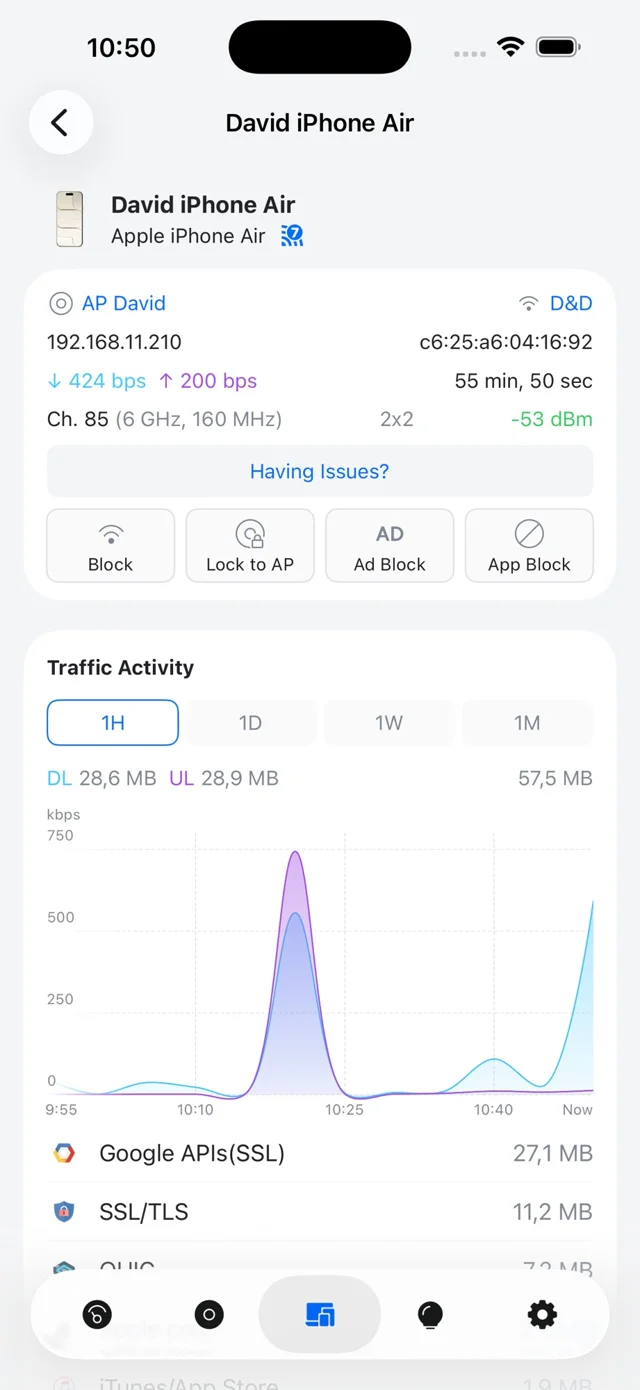
Operations teams view active client connections, signal values and AP assignments in real time from one dashboard.
Displays connected access point details, current signal strength readings and live network traffic activity for every device.
Targets signal levels of -50 to -60 dBm, with roaming to adjacent access points often occurring at -70 to -75 dBm.
Configures Fast Roaming, BSS Transition and Roaming Assistant once per site to assist device transitions.

Access points for docks, yards and offices, a wireless bridge, a panel switch and a rack switch.
Legacy scanners lacking 802.11r support operate on a dedicated WPA2 network with Protected Management Frames disabled, leaving modern devices on Fast Roaming.
Moving crane radios remain out of scope without crane manufacturer approval. Equipment lacks hazardous-location ratings and installs only in unclassified building areas.
U7 Pro operates from -30 to 40 degrees C in climate-controlled spaces. U7 Industrial handles -40 to 70 degrees C with IP67 protection for unconditioned facilities and docks.
Survey building layout with RF meters to evaluate baseline signal propagation and identify metal obstacle shadows.
Map access point locations for racked aisles, loading docks and trailer yards based on survey readings.
Run Cat6 lines to PoE switches, mount access points, configure VLANs and enable site roaming settings.
Survey completed layout again and walk active pick routes carrying a handheld barcode scanner to check roaming.
Access point quantities depend on racking height, product materials and facility layout. Onsite surveys provide exact counts for coverage. Call (844) 422-7000 to schedule a survey.
Fast Roaming speeds hand-offs as scanners move between access points. Roaming performance depends on device hardware support for 802.11r and environmental factors.
Legacy scanners missing 802.11r capability connect to a dedicated WPA2 network with Protected Management Frames disabled, allowing newer hardware to utilize Fast Roaming.
IP67-rated U7 Industrial access points cover dock doors, while U7 Outdoor units cover trailer yards. Remote shacks connect via UDB-Pro wireless bridges.
Scanner traffic runs on isolated VLANs separate from office and guest Wi-Fi over shared access points. Automated conveyor controllers connect to dedicated operational technology networks.
Projects begin with an onsite RF survey. Service covers Charleston, North Charleston, Summerville, Ridgeville, Pooler, Garden City, Effingham and Savannah port corridors. Call (844) 422-7000 to schedule.
Call (844) 422-7000 or book an onsite walkthrough to review signal requirements across your facility.