Local document extraction
AI document processing for Charleston businesses
Turn piles of delivery tickets and supplier invoices into clean system records, while your own team checks and approves every line before writing happens.
Paper to system records
Team members approve every record
Scans, photographs and PDFs are read into typed fields. A person on your team approves every record before it reaches your accounting system, CRM or practice software as structured rows.
- 1
Confidence thresholds guide reviews
High-confidence records flow quickly through a threshold, while your team reviews uncertain fields closely before anything reaches your accounting or CRM systems.
- 2
One click corrects a field
Corrections happen fast. Review screens show extracted fields right beside your original page, letting you fix an ambiguous number with a single click.
- 3
Private cloud processing
Documents stay safely in storage your company owns. Extraction runs entirely in your own cloud account, keeping private business data securely controlled.
Common documents read for local businesses
Find your daily paper trail. Each setup targets a specific kind of document, pulling out exact fields your operations team needs to verify and push into your systems.
Select your business type
Related office setups
Intelligent document processing finds specific details
Extracted values come back as typed fields. Dates format as dates, and subtotals format as currency. Microsoft's Read model extracts printed and handwritten text from PDFs and scanned images.
Select a reading example
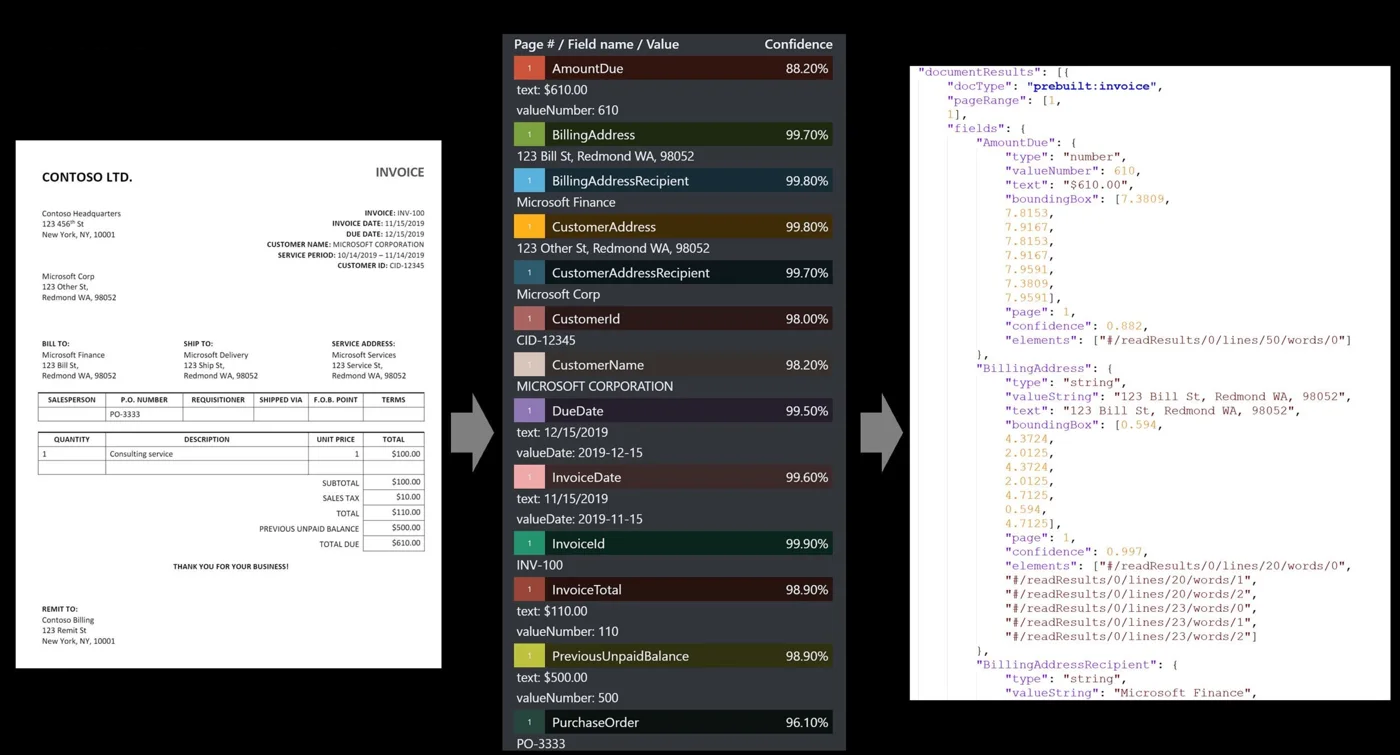
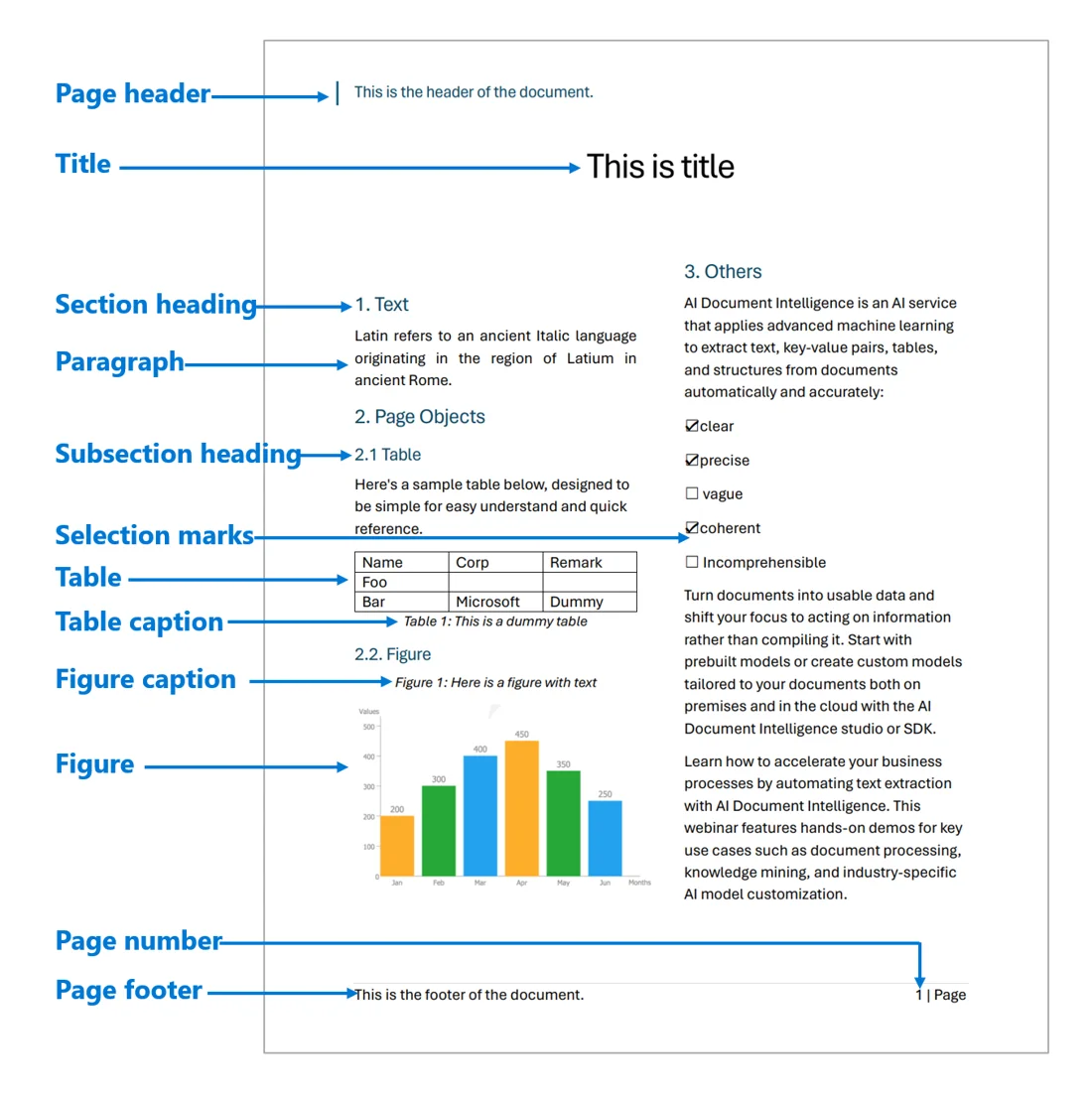

Extracting data from PDFs and scans
Built-in readers handle standard business paperwork. Custom readers tackle your unique forms. Custom classifiers identify document types before matching extraction models run.
Select a document type
Microsoft documentation:Model overview,Invoice,Contract,Bank statement,US tax.
Handling difficult forms and messy pages
Real paperwork gets complicated. Missing fields, strange tables and unexpected supplier updates require a defined field schema dictating what happens when a value is ambiguous.
Line items across page breaks
Tables with line items that run across a page break, or have a subtotal in the middle, are harder to extract than single fields.
Handwriting tested on real files
Handwriting is tested directly against your own documents before any accuracy is promised, measuring results against pages whose correct values are known.
Detecting vendor form changes
Supplier template changes must be detected. Unrecognized layouts are queued for closer human review rather than silently extracting wrong numbers from a new form.
Cost of a wrong record written twice
Writing a wrong record into the accounting system twice costs more than misreading a document once. A person approves every record before it reaches a system.
Building your document processing pipeline
Single document types normally take three to six weeks to build, with most time spent handling awkward documents.
- 1
Pick one document type
Document types set your scope. Each type is built as its own project to keep goals focused and manageable.
- 2
Collect hundreds of real files
Samples of a few hundred real documents are collected for your build, including awkward ones with handwriting, strange tables or poor scans.
- 3
Define fields and measure accuracy
Field schemas define what each field contains. Accuracy is measured rigorously against sample documents whose correct values are already known.
- 4
Connect approved records to systems
Final approved records push cleanly into your accounting system, practice system or CRM as structured rows ready for daily operations.
Frequently asked questions
- Where do the documents go?
Documents stay in storage your company owns. Processing and extraction run entirely inside your own cloud account, keeping private business files securely under your direct control.
- Who approves what gets written?
A person on your team approves every record before it reaches any system. Confidence thresholds send high-confidence records through quickly, queuing uncertain fields for closer human review.
- Can it read handwriting?
Built-in models extract handwritten text, but handwriting is always tested directly against your own documents first before any accuracy is promised for your files.
- What happens when a supplier changes its invoice layout?
Supplier template changes are detected automatically. Instead of silently extracting wrong numbers, unrecognized layouts flag the document and send it straight to your team for careful review.
- Can multiple document types be built at once?
Each document type is built as its own separate project. Single document types normally take three to six weeks to build, with most time spent on awkward documents.
- What systems do approved records go into?
Approved records are written directly into your accounting system, your CRM or your practice management software as structured rows of data ready for operations.
Stop typing daily paperwork by hand
Book a conversation to discuss your time-consuming documents and see how your team can review extracted fields instead of typing them.