Multi-site SD-WAN networking
Connect every location into one private company network
CloudCentric establishes a site-to-site VPN between your buildings, connecting networks to share resources from Charleston to Savannah as if they were a single site.
Sites sharing one network
Gateways at each building join together using a private site-to-site VPN. Your staff connect to networks at several locations and share resources between them as if they were a single site.
Branch offices connect through a central hub to reach file servers. Remote locations share resources with your headquarters over a private tunnel as if both sites were a single building.
Retail storefronts and restaurants route traffic over a site-to-site VPN back to your main location. Remote buildings share network resources with headquarters as if both locations were a single site.
Property managers connect networks at several locations to share resources between them. Satellite offices access central files over a private site-to-site VPN as if all locations were a single site.
Campuses share databases or main file servers over a private site-to-site connection. Teachers and administrators log into main campus resources from any satellite building on the shared network.
Sites shown here represent a typical working example.
Hub or mesh designs
Two network layouts connect your locations depending on your resources. Hub and spoke designs use central hubs, while mesh groups connect every site directly to all other sites.
Select a site to cut its main line.
Network gateways shift your private link to a backup line if the primary internet connection becomes unreachable. Traffic returns to the first line once your main service recovers.
A failover tunnel takes time to re-establish in a mesh.
Sites shown here represent a typical working example.
| Hub and spoke | Mesh interconnect | |
|---|---|---|
| Layout | Branches connect through a central hub, or through several hubs | Every site connects directly to every other site |
| Size | Up to 1,000 tunnels | Up to 20 sites |
| Same addresses at two sites | NAT lets sites with overlapping subnets connect | Not supported; every site needs its own addresses |
| Between branches | Can be isolated, so branches reach the hub and not each other | Traffic flows directly between sites; firewall rules are set at each site |
| When a line fails | Each branch can hold up to 4 tunnels to the hub; the Scalable setup, with one tunnel, has a temporary interruption | A failover tunnel takes time to re-establish |
| Needs | A hub gateway with a public IP address | At least one gateway with a public IP address |

Second internet line ready
Gateways accept up to eight internet connections, running failover setups if a line becomes unreachable. A cellular modem acts as your second internet line, carrying traffic until the first line recovers.
The 80 and 20 split is the manufacturer's own example. Weights are set for each site.
Managed from one dashboard
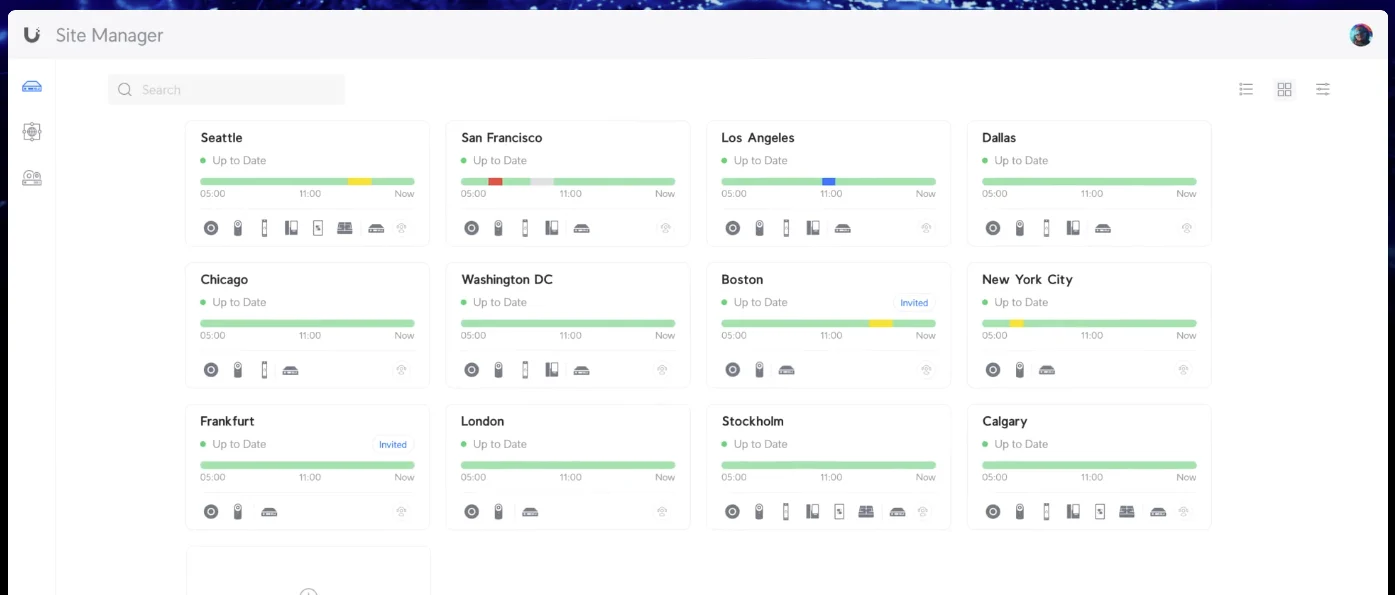
CloudCentric registers every gateway in your organization to one account. Site manager software displays all of a customer's sites in one list, showing each location's devices and current connection status.
Gateways powering your network
Gateways support multiple WAN interfaces and serve as either a central hub or a branch spoke for your private site-to-site VPN tunnels.
Steps to connecting locations
- 1
Walkthrough and network plan
Engineers plan the sites and their internet lines before installing network gateways. Central hubs require a public IP address to host your site-to-site connections.
- 2
Gateway configuration and testing
Technicians set up the private links between your gateways using SD-WAN software. Site Manager establishes connected networks between your locations instead of hand-built tunnels.
- 3
Equipment installation at sites
Gateway hardware sits at each location with a primary internet connection and an optional second line configured for failover.
- 4
Handover and daily management
CloudCentric registers every client gateway to one provider account, managing all of your connected locations together from one dashboard.
Common buyer questions answered
- What can a branch reach at the main office?
Branch staff access central file servers and shared resources just like employees sitting in the headquarters building. Hub setups can isolate branches, ensuring sites reach the central hub but not one another.
- Can two sites use the same internal network addresses?
Hub and spoke layouts use NAT to connect sites having overlapping subnets. Mesh layouts do not support NAT, requiring distinct network addresses for every location in the group.
- How many locations can be linked together?
Hub layouts support up to 1,000 tunnels in total for organizations with central resources. Mesh setups connect groups of up to twenty sites directly to one another to share resources.
- What happens to the link when a site's main internet line goes down?
Site gateways fail over to the building's backup internet line or cellular modem if the first line becomes unreachable. Traffic rides the second line until the primary connection recovers.
- Can remote staff connect to the network too?
Remote workers join the office network through a VPN server running on your gateway. Traveling employees click once in the WiFiman app to access files using the Teleport feature.
Connect your locations today
Contact our team to establish a site-to-site VPN and share resources across multiple business locations.