Three kinds of overdue
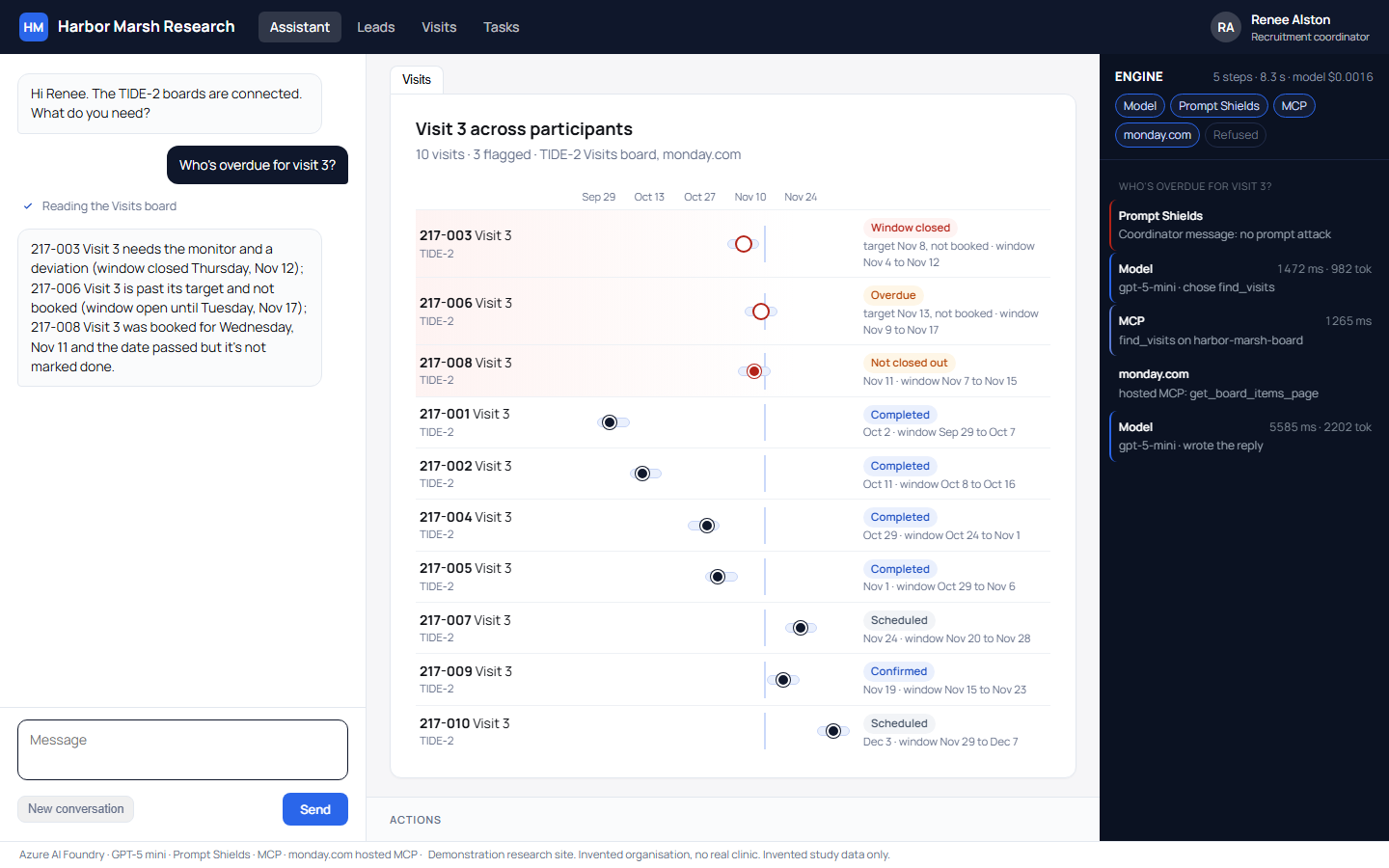
Renee starts by asking who is overdue for visit 3. A canvas beside the chat draws every participant's Visit 3 on a timeline, with each protocol window as a band and the booked date as a dot. Three problems sit at the top, and each is a different kind.
One participant's window has closed, so that visit is a deviation for the monitor, not something to rebook. One is past its target date with the window open until Tuesday. One was booked for a day that has already passed and was never closed out. The server behind the copilot sorts them into those three kinds, and the copilot reports what the server found.
Booking inside the protocol window
Renee asks to book the open-window participant for Thursday the 19th. The server refuses, because Thursday falls outside the protocol window, and an engine panel beside the canvas shows the refusal. She asks for Tuesday the 17th in the morning. The visit is booked on monday.com, the row turns blue and it drops off the problem list.
On our first take, the model turned down the Thursday date on its own, from memory of the earlier answer. No tool ran, so the engine panel showed nothing. We changed the copilot to send every booking request to the server, so a refusal is always on the server's record.
Leads nobody called
Next she asks which of last week's leads nobody has called. Three names come up, each marked Not called, with the source and phone number. She calls one, leaves a voicemail and asks the copilot to log it. The lead's last contact and status change on the board, and a comment goes on the item.
What the copilot can touch
monday.com runs its own MCP server, a standard way for an AI to use a product's tools. It offers 87 tools, including raw API access and deleting boards and automations. The copilot never sees them. Between the two sits our own MCP server with seven study tools: find visits, book a visit, confirm a visit, find leads, log a call, list tasks and comment.
Behind those seven tools is an allowlist. It passes four monday.com tools, reaches the three study boards only, and writes only named columns: last contact and status on Leads, booked date and status on Visits, status on Tasks. The protocol window, target date and participant can't be written, and nothing is ever deleted.
A visit is booked only inside its window, never in the past and never once completed. A call outcome has to be one of six labels. These rules live in the server, so they hold whatever the model decides.
Speed, cost and a real deployment
monday.com's hosted MCP server answers in about half a second. The five questions in the recording took 26 engine steps, 33.6 seconds of agent time and $0.0074 of model time, on gpt-5-mini in Azure AI Foundry.
Recruitment boards hold lead contact details, so a real site keeps them on a monday.com plan with the security terms it needs, and gives the copilot a dedicated user that can see the study boards only.
The copilot works the system the site already uses, and the same approach fits any study system with an API. It's one of four SiteWorks demonstrations, alongside prescreening a volunteer against their own health record, turning a coordinator's inbox into tasks and filed documents, and a copilot over a clinical trial management system. Call (844) 422-7000 and we'll walk you through it.